Picking the right health app took me longer than I expected. I was living in Seattle, Washington, scrolling through hundreds of options in the app store, completely overwhelmed. Knowing what to look for in a BMI calculator app would have saved me a lot of time and frustration. Some apps gave me a number and nothing else. Others felt like a full hospital dashboard crammed into a phone screen. After testing more apps than I can count, I finally figured out what separates a great BMI app from a forgettable one.
What a BMI Calculator App Actually Does
Let me start with the basics. A BMI calculator app uses your height and weight to estimate where your body weight falls on a health scale. BMI stands for Body Mass Index. It is one of the most widely used health screening tools in the world.
It does not diagnose anything. It does not replace your doctor. But it gives you a fast, easy snapshot of where you stand. That snapshot becomes a lot more powerful when the app wraps it in useful context.
The Standard BMI Formula
Every reliable BMI app uses the same formula. There is no secret ingredient here.
Metric formula: BMI equals weight in kilograms divided by height in meters squared.
Imperial formula: BMI equals weight in pounds multiplied by 703, then divided by height in inches squared.
Any app that deviates from this is not calculating BMI correctly. Always verify this in the app’s description or help section before trusting the results.
Why BMI Is Used in Health Tracking
BMI became a global standard because it is simple and fast. You do not need a lab or expensive equipment. You need two numbers: your height and your weight.
Major health organizations that use BMI as a screening benchmark include the CDC, the WHO, the American Heart Association, and the National Institutes of Health. These organizations rely on BMI to identify weight-related health risks at a population level.
That said, BMI has real limitations. It cannot tell the difference between muscle and fat. A muscular person can show a high BMI while being perfectly healthy. An older adult can show a normal BMI while carrying too much body fat. Good apps acknowledge these limitations and add other metrics to fill the gaps.
Why Choosing the Right BMI Calculator App Matters
This is where I want to be direct with you. The wrong app will waste your time. It might even give you a false sense of security or unnecessary worry.
I downloaded one app early on that showed me a BMI of 26 with a red warning label and nothing else. No context. No explanation. No guidance. I spent 20 minutes searching online to figure out what that number actually meant for me. A good app would have explained it in three sentences right on the screen.
The right app supports your fitness goals, helps with weight management, and builds long-term health awareness. Those three things together are what separate a useful app from a useless one.
Common Problems With Low-Quality BMI Apps
After testing over a dozen apps, I noticed a clear pattern in the bad ones. Here are the most common problems:
- Inaccurate calculations due to rounding errors or incorrect formulas
- No explanation of what the BMI result means
- Excessive pop-up ads that interrupt the experience
- No tracking features, so every check starts from scratch
- Privacy issues with vague or missing data policies
- No support for both metric and imperial units
If you notice any of these in an app, move on. Better options exist and many of them are free.
Key Features to Look for in a BMI Calculator App
Now we get to the heart of the matter. These are the features I look for every time I evaluate a new BMI app. Some are must-haves. Others are nice bonuses.
Accurate BMI Calculation
This sounds obvious, but you would be surprised how many apps get the formula slightly wrong. Always check that the app uses the standard BMI formula that health organizations recognize.
A reliable app should also let you switch between metric and imperial units. This matters if you travel, share the app with family, or just prefer one measurement system over another. Flexible input options make the app more accessible and more useful.
Clear BMI Category Explanation
A number without context is just noise. The best apps tell you what your result means the moment they show it.
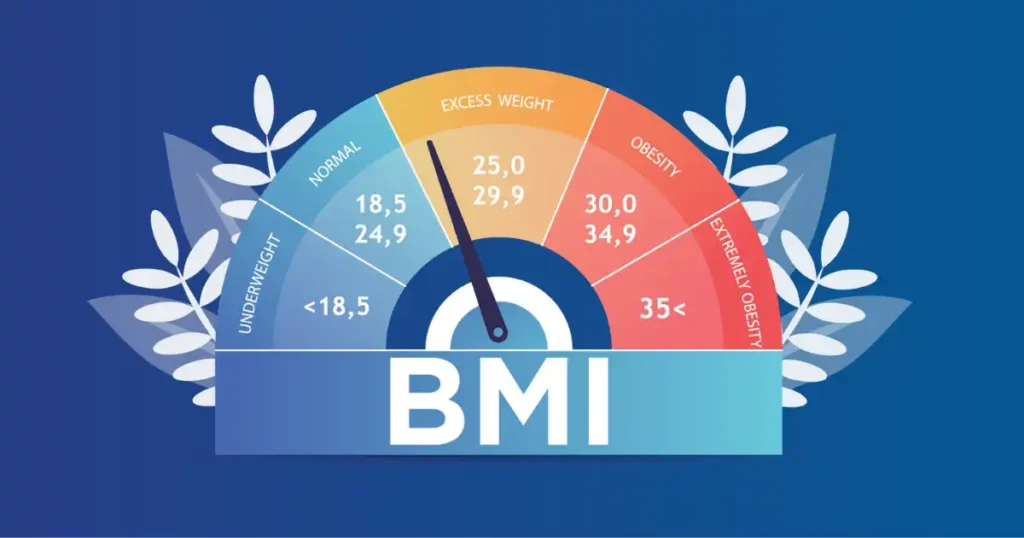
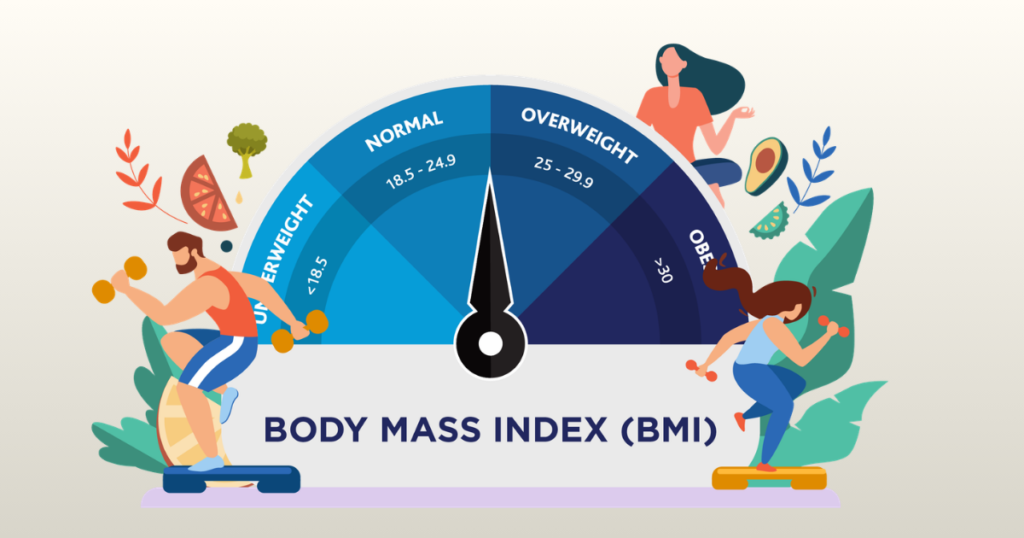
Standard BMI categories for adults are underweight (below 18.5), normal weight (18.5 to 24.9), overweight (25 to 29.9), and obese (30 and above). These classifications come directly from the CDC and WHO.
A good app will display your category clearly, explain what it means for your health, and suggest what you can do next. That last part is what makes the app worth keeping.
Additional Health Metrics
This is where great apps pull away from average ones. A strong BMI calculator app does not stop at BMI. It gives you supporting data that makes the BMI number more meaningful.
The best additional metrics to look for include:
- Body fat percentage estimate based on age, gender, and BMI
- BMR (Basal Metabolic Rate), which tells you how many calories your body needs at rest
- Daily calorie needs based on your activity level
- Ideal weight range for your height
- Waist-to-height ratio for metabolic risk assessment
These features turn a simple calculator into a real health tool.
Progress Tracking and History
One of the biggest mistakes I see people make is using a BMI app as a one-time calculator. BMI matters most when you track it over time. A single reading tells you where you are. A trend tells you where you are going.
Look for apps that store your history automatically. Charts that show your BMI over weeks or months are especially helpful. They let you see the impact of lifestyle changes in a clear, visual way. That feedback loop is incredibly motivating.
Essential Features of a Good BMI Calculator App
| Feature | Why It Matters |
| Accurate BMI formula | Ensures correct health classification every time |
| Metric and imperial unit support | Works for all users regardless of location or preference |
| Clear result explanation | Helps users understand what the number means |
| BMI category display | Shows underweight, normal, overweight, or obese clearly |
| Body fat percentage estimate | Adds important context beyond just the BMI number |
| BMR and calorie calculator | Connects BMI to daily energy and nutrition needs |
| Progress tracking with history | Allows long-term monitoring of health trends |
| Clean and simple interface | Makes the app easy to use and stick with over time |
| Privacy policy and data security | Protects sensitive personal health information |
| Regular app updates | Keeps the app accurate, secure, and functioning properly |
Apps that check most of these boxes are worth your time. Apps that check fewer than half are usually not.
User Experience Features That Matter in BMI Apps
Accuracy gets you in the door. User experience keeps you there. I have abandoned more than one technically solid app because using it felt like a chore.
Clean and Simple Interface
The best health apps feel effortless. You open them, enter two numbers, and get a clear result. No confusion. No guessing. No hunting through menus to find the calculator.
A well-designed app should load quickly, show clear input fields for height and weight, avoid clutter and unnecessary graphics, and display results prominently without burying them in other data.
If an app feels confusing in the first minute, it will feel more confusing after six months of use. First impressions matter here.
Fast Calculation and Instant Results
Nobody wants to wait for a BMI result. The calculation is simple math. It should happen the moment you finish entering your data.
Apps that show a loading screen after you enter height and weight are adding unnecessary friction. The best apps show your result before you even lift your finger from the screen.
Easy Navigation
Beyond the main calculator, the rest of the app should be equally easy to use. Look for clear menus that label each section plainly, readable charts that do not require explanation, simple settings that let you customize units and preferences, and an easy path to your tracking history.
Good design does not draw attention to itself. You just know where to go without thinking about it.
Offline Functionality
This is a feature most people overlook until they need it. Can the app calculate BMI without an internet connection? It should.
BMI is basic math. There is no reason an app should require internet access to complete a simple formula. Apps that require connectivity for basic calculations are usually designed to serve ads or collect data rather than serve you.
Expert Advice on Choosing a BMI Calculator App
Health professionals have strong opinions on this topic. And their advice lines up closely with what I have learned from personal experience.
Dr. Yoni Freedhoff, obesity specialist and medical professor, has pointed out that BMI is useful for screening populations but that individual health assessments should consider body composition and lifestyle. That guidance matters when choosing an app. An app that shows only a number is not giving you an individual assessment. It is giving you a population-level statistic applied to one person.
The best apps bridge that gap. They start with BMI and layer in additional context that makes the result more personal and more actionable.
Metrics Experts Recommend Tracking Alongside BMI
Combining BMI with other data points gives you a far more complete picture of your health. Here is what health professionals consistently recommend:
- Waist circumference: a strong predictor of metabolic risk and cardiovascular health
- Body fat percentage: distinguishes between fat mass and lean muscle mass
- Daily physical activity levels: affects how BMI should be interpreted
- Caloric intake and nutrition habits: connects weight to daily food choices
- Resting heart rate: a simple indicator of cardiovascular fitness
Apps that help you track even two or three of these alongside BMI are significantly more valuable than apps that stand alone.
Basic BMI Apps vs Advanced Health Apps
| Feature | Basic BMI App | Advanced Health App |
| BMI calculation | Yes | Yes |
| BMI category display | Sometimes | Always |
| Body fat percentage estimate | No | Yes |
| BMR and calorie needs | No | Often included |
| Progress charts over time | Limited or none | Full history with charts |
| Fitness and wearable integration | Rare | Common |
| Offline functionality | Usually yes | Usually yes |
| Personalized health insights | No | Yes |
| Privacy policy | Variable | Usually strong |
Basic apps are fine for a one-time check. If you are serious about health tracking, an advanced app is a smarter investment of your time.
Real-Life Experience: Testing BMI Calculator Apps Side by Side
Let me take you back to that Sunday afternoon in Seattle. I sat down with four apps open at the same time, all showing the same height and weight. Here is what I found.
App one showed my BMI instantly. That was it. No category. No explanation. No history. I closed it after 30 seconds.
App two showed my BMI with a color-coded category label. It said overweight in orange text. Helpful. But still no explanation of what that meant for me specifically or what I could do about it.
App three asked for my age, gender, and activity level in addition to height and weight. It took about 90 seconds to set up. The results showed my BMI, an estimated body fat percentage, my daily calorie needs, and a simple health insight. That extra 60 seconds of setup paid off immediately.
App four was the most complete. It included everything from app three plus a full history chart, meal logging integration, and a waist circumference input. It took three minutes to set up. But after one week of use, I had a clear trend line showing my BMI dropping gradually. That visual was more motivating than any number on its own.
The lesson here is straightforward. More setup time does not mean more complicated. It means more personalized. And personalized health data is far more useful than generic numbers.
Signs You Found a Reliable BMI Calculator App
Once you start testing apps, certain signals will tell you quickly whether an app is trustworthy or not.
Positive and Consistent User Reviews
User reviews reveal real-world performance. Look for apps with high ratings across a large number of reviews. A 4.7 rating with 500 reviews is more meaningful than a 4.9 rating with 12 reviews.
Read the negative reviews too. They often point out specific bugs, accuracy issues, or privacy concerns that positive reviews skip. If you see the same complaint repeated by multiple users, take it seriously.
Also check when the most recent reviews were posted. An app with great reviews from three years ago but nothing recent may no longer be maintained.
Regular App Updates
Health apps need consistent updates. Operating system changes, new device models, and evolving health data standards all require app developers to keep their products current.
Check the last update date in the app store. An app that has not been updated in over a year is a risk. Bugs may go unfixed. Security vulnerabilities may appear. Features may stop working on newer devices.
Active development signals that the team behind the app cares about its quality and its users.
Transparent Privacy and Data Protection
This one matters more than most people realize. BMI apps collect personal health data. Height, weight, age, gender, and activity levels are all sensitive information.
A trustworthy app will have a clear privacy policy, explain exactly what data is collected and why, allow you to delete your data if you choose, and not sell your personal health data to third parties.
Before you install any health app, spend two minutes reading the privacy policy. If the language is vague or the policy does not exist at all, that is a serious warning sign.
Common Mistakes When Choosing BMI Apps
Most people make at least one of these mistakes. I made two of them myself before I knew better.
Choosing the First App in the Search Results
App store rankings are influenced by advertising spend, download volume, and review manipulation. The first result is not always the best option.
Take five minutes to compare three or four apps before choosing one. Check their features, read their reviews, and look at their last update date. That small investment of time will save you weeks of frustration with a poor-quality app.
Prioritizing Design Over Accuracy
Some apps look beautiful. Clean animations, smooth transitions, appealing color schemes. But if the BMI formula is wrong or the data is inaccurate, the design means nothing.
Always verify the formula an app uses before committing to it. Most reputable apps will mention the CDC or WHO standards in their description or FAQ. If they do not, run a quick test. Enter known values and check the result against a manual calculation.
Ignoring Health Insights and Explanations
An app that shows only a number offers very limited value. The number alone does not tell you what to do next. It does not tell you whether your weight trend is improving. It does not connect your BMI to your daily habits.
Choose apps that provide explanations, actionable guidance, and tracking tools. These features are what turn a passive health check into an active health habit.
Skipping the Privacy Check
Health data is personal. Skipping the privacy review is a mistake many people regret later. Free apps in particular often rely on data collection as their business model.
A few minutes reviewing the privacy policy before installation is always worth it. You are sharing information about your body. Make sure you know where that information goes.
Quick Checklist for Choosing the Best BMI App
| Question | What to Look For |
| Is the BMI formula correct? | Uses standard CDC and WHO approved calculation |
| Does it explain your result? | Shows BMI category with clear health context |
| Does it track your history? | Stores previous data and shows trend charts |
| Does it include extra health metrics? | Adds body fat, BMR, calorie needs, or waist ratio |
| Is the interface simple to use? | Clean, fast, and easy to navigate from day one |
| Is there a clear privacy policy? | Explains data collection and protects your information |
| Has it been updated recently? | Last update within the past 6 to 12 months |
| Does it work offline? | Calculates BMI without needing an internet connection |
| Are user reviews positive? | High rating with consistent and recent feedback |
| Is it free from excessive ads? | Ads do not interrupt the core experience |
Apps that pass eight or more of these checks are usually excellent choices. Apps that pass fewer than five are worth skipping.
How to Test a BMI App Before Committing to It
Most people download an app, use it once, and either keep it or delete it based on that first impression. There is a better approach.
Run a Manual Accuracy Check
Before trusting any app with your health data, test it manually. Enter your known height and weight. Then calculate your BMI by hand using the standard formula. If the results match, the app is using the correct formula.
This takes two minutes and immediately tells you whether the app is worth trusting.
Check the Category Labels
Enter a BMI of 24.5 and see what category the app assigns. The correct answer is normal weight. Enter 25.5 and the correct answer is overweight. If the app labels these differently, its categories are off.
Test the Tracking Feature
Log a second entry with slightly different numbers and see if the app saves both. Then navigate to the history section. Can you see both entries? Does it show a chart or trend? If yes, the tracking feature works as advertised.
Try It Without Internet
Turn off your wifi and mobile data. Then open the app and try to calculate your BMI. If it works, great. If it shows an error or loading screen, the app requires connectivity for basic functions. That is a limitation worth knowing before you rely on it.
BMI Tracking for Specific Groups
Not everyone uses a BMI app for the same reason. Different goals call for slightly different features.
BMI Apps for Weight Loss
If your goal is weight loss, look for apps that combine BMI tracking with calorie counting and goal-setting features. Seeing your BMI trend downward alongside your calorie data creates a powerful feedback loop. Apps that set weekly or monthly BMI goals with reminders are especially useful for this purpose.
BMI Apps for Fitness and Muscle Building
Athletes and people building muscle need apps that go beyond standard BMI. Because muscle weighs more than fat, BMI can increase as you get healthier. Apps that include body fat percentage tracking and lean mass estimates give a much more accurate picture for fitness-focused users.
Look for apps that integrate with fitness trackers or allow manual entry of workout data.
BMI Apps for Seniors
Older adults face a unique challenge with BMI. Muscle loss with age can result in a normal BMI reading even when body fat is elevated. Apps that include age-adjusted health insights and waist measurement tracking are more appropriate for users over 60.
Simple, large-text interfaces are also a significant plus for older users.
BMI Apps for Families and Children
Standard BMI ranges do not apply to children and teens. Pediatric BMI is calculated differently and compared against age and sex-specific growth charts from the CDC. If you want to track BMI for a child, look for apps that include a pediatric BMI mode or use a dedicated tool from the CDC website.
Free vs Paid BMI Calculator Apps
Most people start with free apps. That makes sense. But free does not always mean best, and paid does not always mean worth it.
Free apps often include ads, limited tracking features, and fewer health metrics. Some free apps also collect and sell user data as their primary revenue source. Read the privacy policy carefully for any free app before using it.
Paid apps or apps with optional premium tiers usually offer ad-free experiences, advanced tracking tools, more health metrics, and stronger data protection. If you plan to use the app daily as part of a serious health routine, a small monthly or annual fee is often worth it.
A middle-ground option is a free app with an optional paid upgrade. Use the free version first to confirm the app meets your needs before committing to the paid version.
Final Recommendation
After everything I have tested and learned, here is my honest recommendation.
Start by knowing what you need. If you want a quick, occasional BMI check, a simple free app with accurate calculations and clear category labels is all you need. Download it, test it once, and keep it on your phone for when you need it.
If you are serious about tracking your health over time, invest a few minutes in finding an advanced app. Look for BMI calculation combined with body fat estimates, a calorie tracker, progress charts, and a clean interface. Check the privacy policy. Verify the formula. Read the recent reviews.
The single most important thing to look for in a BMI calculator app is usefulness. Not beauty. Not complexity. Usefulness. Can this app help you understand your health better today than you did yesterday? If yes, it is a keeper.
Knowing what to look for in a BMI calculator app puts you ahead of most people who just grab the first result in the app store. Take that knowledge, test a few apps, and find the one that fits how you actually live.
Your health data has value. Make sure the app you choose is worthy of it.
Disclaimer: This article is for informational purposes only. BMI is a general screening tool and should not replace professional medical advice. Always consult a qualified healthcare provider for personalized health guidance.
Frequently Asked Questions
1. What is the most vital thing for what to look for in a bmi calculator app?
Accuracy is key. Look for a tool that uses your age and sex. These details are vital for what to look for in a bmi calculator app to get a true score.
2. Should I check for data privacy in what to look for in a bmi calculator app?
Yes, keep your data safe. A good tool will not share your info. This is a must for what to look for in a bmi calculator app for your peace of mind.
3. Are charts part of what to look for in a bmi calculator app?
Clear graphs help you see your progress. Look for visual tools. This is a top trait in what to look for in a bmi calculator app for daily tracking.
4. Why is ease of use a factor for what to look for in a bmi calculator app?
You want to enter your stats fast. A simple screen is key. This ease is part of what to look for in a bmi calculator app to save you time.
5. Is a history log important for what to look for in a bmi calculator app?
Yes, it helps you track your weight over time. A log is a great feature in what to look for in a bmi calculator app to see how far you have come.
6. Does size matter in what to look for in a bmi calculator app?
Pick an app that does not take much space. A light tool is a good part of what to look for in a bmi calculator app for a fast and smooth phone.
7. Should I read reviews for what to look for in a bmi calculator app?
User feedback shows if the tool works well. High ratings are a guide for what to look for in a bmi calculator app before you hit the download button.

Shakitul Alam is the CEO, Owner, and Co-founder of BMI Calculator Women AI. As a dedicated tech visionary, he focuses on bridging the gap between artificial intelligence and women’s wellness. Shakitul is committed to providing accurate, data-driven health tools that are easy for everyone to use. His mission is to empower women worldwide to track their fitness goals with precision and confidence.