Not all BMI calculators are built the same. I realized this a few years ago while helping a client in Portland set up a simple health tracking routine. She had tried three different online tools and walked away confused every time. The numbers showed up, but nothing explained what they meant or what she should do next. That experience pushed me to dig deep into what features actually make a BMI calculator more accurate and useful in real life. What I found changed how I recommend these tools entirely.
Why Features Matter in a BMI Calculator Tool
A BMI calculator might look simple on the surface. You type in height and weight, and a number pops out. But there’s a big gap between a basic number-spitter and a tool that actually helps someone understand their health.
Most people who use a BMI calculator aren’t researchers. They’re regular folks trying to understand if their weight is healthy, track a fitness goal, or prepare for a doctor’s visit. For them, context matters as much as the calculation itself.
The Centers for Disease Control and Prevention is clear that BMI is a screening measure, not a diagnosis. A well-designed calculator should reflect that. It should give users enough context to understand their result, enough guidance to take action, and enough clarity to avoid unnecessary worry.
When I review health tools, I look at whether the features serve the user’s actual needs. A calculator that just outputs “25.4” and stops there misses the point entirely. The best ones go further.
Instant and Accurate BMI Calculation
Speed and accuracy are the foundation. If a BMI calculator gets the math wrong or takes too long to respond, nothing else matters.
A reliable tool processes the formula the moment you finish entering your numbers. No submit button. No page reload. Results appear instantly. That kind of responsiveness builds trust.
Standard BMI Formula Both Systems
The formula itself is straightforward but must be implemented correctly for both measurement systems. Here’s how it breaks down:
| Measurement System | Formula | Example Calculation |
| Metric | Weight in kg divided by Height in m squared | 70 kg divided by 1.75 squared = 22.9 |
| Imperial | 703 times Weight in lb divided by Height in inches squared | 703 times 154 divided by 69 squared = 22.7 |
Any well-built calculator handles both instantly. The user types their numbers and the result appears in real time. That seamless experience is what separates a polished tool from a clunky one.
What Reliable Calculation Looks Like
Beyond the formula, a few technical details determine whether a tool is truly reliable:
- Automatic formula processing with no manual steps
- Real-time calculation without page reloads
- Compatible with both mobile and desktop screens
- Handles decimals and fractional inputs correctly
- Works offline or on slow internet connections
These might seem like small things. But when someone is in a clinic waiting room in Charlotte trying to quickly check their BMI before a doctor’s appointment, a laggy or error-prone tool is genuinely frustrating.
Support for Multiple Unit Systems
People across the United States and around the world don’t all measure height and weight the same way. A good BMI calculator removes that friction by supporting both metric and imperial inputs.
This matters more than it sounds. Asking someone to convert kilograms to pounds before using a tool is a real barrier. Many users won’t do it. They’ll abandon the tool and look for another one.
Common Unit Combinations by Region
| Height Unit | Weight Unit | Regions Commonly Using |
| Centimeters or meters | Kilograms | Europe, Asia, most of the world |
| Feet and inches | Pounds | United States, some parts of UK |
| Meters | Kilograms | Scientific and clinical research |
The best calculators let users toggle between systems with a single tap. The formula adjusts automatically. The result is the same either way.
Dr. Michael Jensen, an endocrinologist at the Mayo Clinic, has noted that frictionless input is one of the most underrated factors in health tool adoption. If the tool makes users work before they even start, many simply walk away.
That friction is completely avoidable. A dual-unit BMI calculator removes it entirely.
Clear BMI Category Explanation
Showing a number is only half the job. Explaining what that number means is the other half, and it’s where most basic calculators fall short.
When someone sees a BMI of 27.3, their first question is always the same: is that good or bad? A calculator that doesn’t answer that question has failed its primary job.
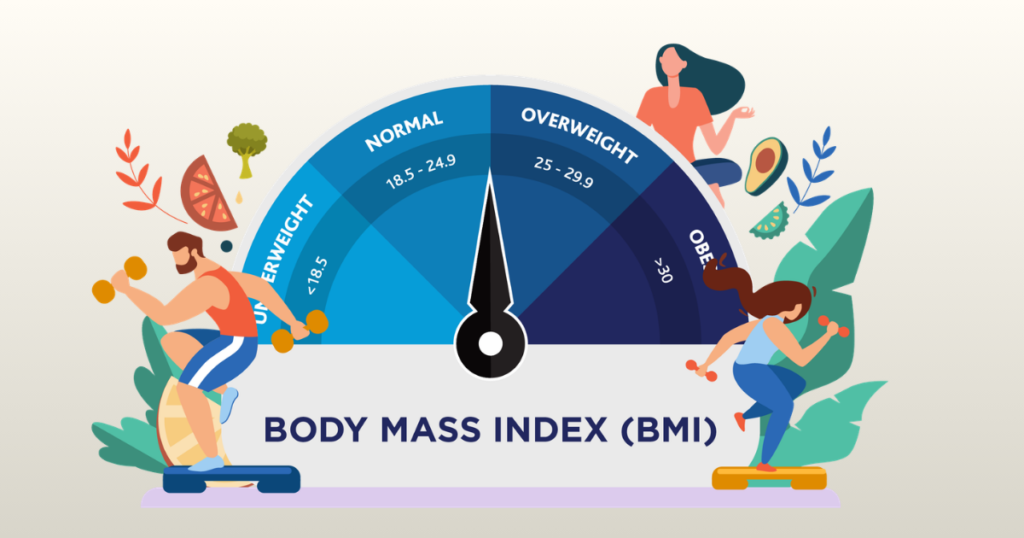
Standard BMI Categories and What They Mean
| BMI Range | Category | General Meaning |
| Below 18.5 | Underweight | May indicate nutritional deficiency or health concerns |
| 18.5 to 24.9 | Normal weight | Generally associated with lowest health risk |
| 25 to 29.9 | Overweight | Moderate risk; lifestyle changes often recommended |
| 30 and above | Obese | Higher risk for several chronic conditions |
These categories should appear clearly alongside the result. Not buried in a footnote. Not hidden behind a link. Right there, next to the number.
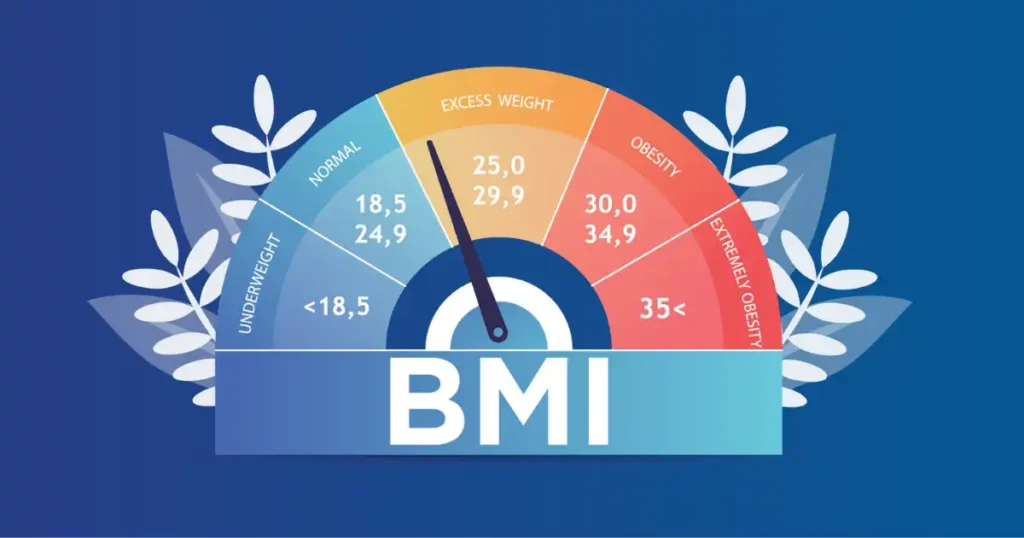
Color coding helps even more. Green for healthy range, yellow for borderline, red for higher-risk categories. Visual signals process faster than text. When users understand their result immediately, they’re more likely to take it seriously.
One thing I always emphasize: the explanation should also remind users that BMI is a screening tool, not a medical diagnosis. That context prevents panic and keeps the tool trustworthy.
Visual Result Indicators
Words and numbers tell people what their result is. Visuals tell them how to feel about it. That emotional layer is what makes a health tool memorable and useful.
I’ve tested dozens of BMI calculators over the years. The ones users come back to almost always have some form of visual feedback. The ones that don’t feel cold and incomplete.
Types of Visual Indicators That Work
- Color-coded BMI scale: a horizontal bar showing where your result falls across the full range
- Status badge: a simple colored label like Healthy, Overweight, or Obese next to the result
- Progress arrows: showing whether a recent change moved the number up, down, or held steady
- Percentage bar: showing how far your BMI sits within its current category
The most effective visual is a sliding scale with your result marked on it. Users can instantly see not just where they are, but how close they are to adjacent categories. That context is genuinely motivating for people working toward a healthier range.
The color logic should be consistent and intuitive: green for healthy, yellow or orange for borderline, red for higher risk. Don’t reinvent the wheel here. Users already understand traffic light color coding.
Age and Gender Considerations
Standard adult BMI formulas don’t apply to everyone equally. A good calculator acknowledges this and adjusts its guidance accordingly.
This is one of the features that separates a responsible tool from a careless one. Applying adult BMI categories to a 12-year-old or a 70-year-old without explanation can cause real confusion and unnecessary worry.
Why Age and Gender Change the Picture
- Children and teenagers require BMI-for-age percentile charts, not fixed adult categories
- Muscle mass naturally decreases with age, which can make BMI less reliable for older adults
- Women and men naturally carry fat differently, especially around the midsection and hips
- Postmenopausal women experience shifts in fat distribution that affect health risk interpretation
The World Health Organization and the CDC both provide age-adjusted and sex-specific BMI guidance. A well-built calculator either includes this context or links users directly to those resources.
For kids and teens specifically, the calculator should explain that their results are interpreted differently than adult results. This prevents parents from misreading their child’s health status based on adult categories.
I’ve seen well-meaning parents in online forums genuinely alarmed by their child’s BMI, only to learn later that the child was perfectly healthy for their age and height. A better calculator would have prevented that anxiety from the start.
Health Risk Insights
One of the most valuable features a BMI calculator can offer is connecting the number to real health outcomes. Numbers without context are forgettable. Numbers linked to conditions people care about are not.
When someone learns their BMI falls in the overweight range, they process that differently when the tool also explains what that range has been linked to in research. It creates urgency without being alarmist.
Health Conditions Commonly Linked to BMI Ranges
- Higher BMI ranges are associated with increased risk for type 2 diabetes
- Cardiovascular disease and high blood pressure risk rise with BMI above 25
- Joint stress and mobility issues are more common with higher body weight
- Sleep apnea is more prevalent in people with higher BMI scores
- Certain cancers have shown statistical links to long-term obesity
The framing here matters enormously. A good calculator presents these as general associations, not personal diagnoses. Something like: research shows elevated risk for these conditions in people with BMI above this range. Your personal risk depends on many other factors.
That kind of measured, honest communication builds trust. It respects the user’s intelligence. And it encourages them to have a real conversation with a healthcare provider rather than either dismissing the result or panicking about it.
Ideal Weight Range Suggestions
Telling someone they’re overweight without offering any direction is frustrating. A more useful feature shows users what a healthy weight range looks like for their specific height. That shifts the experience from judgment to guidance.
This feature is one I actively look for when evaluating any health calculator. It changes the tone entirely.
Sample Healthy Weight Ranges by Height
| Height | Healthy Weight Range (lbs) | Healthy Weight Range (kg) |
| 5 feet 2 inches | 104 to 135 lbs | 47 to 61 kg |
| 5 feet 4 inches | 110 to 144 lbs | 50 to 65 kg |
| 5 feet 7 inches | 121 to 158 lbs | 55 to 72 kg |
| 5 feet 10 inches | 132 to 173 lbs | 60 to 79 kg |
| 6 feet 0 inches | 140 to 183 lbs | 64 to 83 kg |
These ranges correspond to BMI values between 18.5 and 24.9, which is the standard healthy adult range. When a calculator shows a user their specific healthy target window, it makes the goal feel real and achievable rather than abstract.
A person who sees “you could weigh between 132 and 173 pounds at your height” has something concrete to work toward. That’s far more actionable than just “your BMI is 27.”
Some tools also show how many pounds above or below the healthy range the user currently sits. That incremental framing reduces overwhelm and helps users set realistic short-term goals.
Mobile-Friendly Interface
Most people check health information on their phones. If a BMI calculator doesn’t work well on a small screen, it will lose a huge portion of its potential users before they even finish entering their data.
I’ve watched people try to use desktop-optimized health tools on their phones and give up in thirty seconds. The buttons were too small, the input fields cramped, the results hard to read. All of that is avoidable.
What Mobile Optimization Looks Like in Practice
- Large, finger-friendly input fields that don’t require a stylus to tap accurately
- Simple sliders as an alternative to typing exact numbers
- Responsive layout that adjusts cleanly to any screen size
- Fast loading time under two seconds even on a 4G connection
- Results that are large enough to read without zooming in
- No horizontal scrolling required at any point
Think about where people actually use these tools. Someone at a gym in Seattle after a workout. A patient in a waiting room. A person at home on the couch after seeing a fitness ad on their phone. None of those situations involve a desktop computer.
Mobile-first design isn’t a bonus feature for a BMI calculator. At this point, it’s a basic requirement.
Progress Tracking Feature
A single BMI reading tells you where you are today. A series of readings over time tells you whether your efforts are actually working. Progress tracking transforms a one-time check into a real health monitoring tool.
This feature matters most to people on active weight loss or fitness journeys. Seeing the number drop over months, even slowly, is one of the most motivating experiences in health improvement.
What Good Progress Tracking Includes
- Ability to save results by date without requiring account creation
- Simple chart or graph showing BMI trend over weeks or months
- Option to log weight changes alongside BMI changes
- Comparison view showing starting point versus current reading
- Export option to share data with a doctor or trainer
Sample Progress Tracking Log
| Date | Weight | BMI | Category |
| January 5 | 192 lbs / 87 kg | 28.4 | Overweight |
| February 5 | 186 lbs / 84 kg | 27.5 | Overweight |
| March 5 | 180 lbs / 82 kg | 26.6 | Overweight |
| April 5 | 175 lbs / 79 kg | 25.9 | Overweight |
| May 5 | 170 lbs / 77 kg | 25.1 | Overweight (close to healthy) |
Even without reaching the healthy range yet, this person can see clear, consistent progress. That visual record keeps motivation alive during the stretches when results feel slow.
Some tools notify users when they cross a category threshold, like moving from obese to overweight, or from overweight to healthy. That kind of milestone acknowledgment is small but genuinely meaningful.
Educational Content Built Into the Tool
A BMI calculator that teaches while it calculates is worth ten times more than one that just shows a number. Education is what turns a passive check-in into an active health decision.
The Harvard T.H. Chan School of Public Health has long emphasized that BMI works best when combined with lifestyle context. A good calculator reflects that philosophy by weaving education into the experience rather than keeping it separate.
Educational Elements Worth Including
- A plain-language explanation of what BMI measures and what it doesn’t
- Notes on BMI limitations, especially for athletes and older adults
- Links to reliable nutrition resources like the USDA dietary guidelines
- Simple fitness tips tied to the user’s specific BMI category
- Explanation of related metrics like waist circumference and waist-to-hip ratio
- Guidance on when to consult a doctor versus when to self-manage
This educational layer doesn’t need to be long or overwhelming. Short, clear callout boxes work perfectly. A sentence or two next to the result that says something like: BMI doesn’t measure body fat directly. Athletes and older adults may get different results from the same number. That kind of transparency builds credibility.
Users who feel informed trust the tool more. They’re also more likely to share it, bookmark it, and return to it.
BMI Limitations Transparency
The most trustworthy BMI calculators don’t hide the tool’s weaknesses. They address them head-on. That honesty is a feature, not a drawback.
BMI has real limitations that matter to a significant portion of users. A calculator that acknowledges these limitations is more credible, more useful, and more ethical than one that presents BMI as a perfect health measure.
Key Limitations Every Good Calculator Should Mention
- BMI cannot distinguish between fat mass and lean muscle mass
- Athletes with high muscle density often show elevated BMI scores despite being very lean
- Older adults may have a normal BMI while carrying excess body fat due to muscle loss
- BMI does not measure where fat is stored, which matters greatly for metabolic health
- Standard BMI cutoffs may not apply equally across all ethnic backgrounds
- BMI is a population-level screening tool, not a personal health diagnosis
A simple note at the bottom of the results page covering these points takes maybe thirty seconds to read. But it can prevent a muscular athlete from thinking they need to lose weight, and it can prompt someone with a normal BMI but a large waist to take their health more seriously. Both outcomes matter.
Privacy and Data Protection
Health data is personal. People want to check their BMI without worrying that their height, weight, and health information is being stored, sold, or used in ways they didn’t agree to.
This concern is legitimate. Privacy matters especially in health-related tools, where users might share sensitive information they wouldn’t post publicly.
Privacy Features Users Should Expect
- No account creation required to use the calculator
- No personal data stored on servers without explicit user consent
- Clear privacy policy that’s easy to find and easy to read
- Option to use the tool anonymously without logging in
- No third-party data sharing for advertising purposes
I always check the privacy policy of any health tool before recommending it. If I can’t find it easily, or if it’s written in dense legal language designed to obscure rather than clarify, that’s a red flag.
Users who trust a tool use it more consistently. Consistent use leads to better tracking and better health outcomes. Privacy isn’t just an ethical issue. It’s a practical one.
Fast Loading and Lightweight Design
Speed is a feature. This point gets underestimated in health tool design, but it matters enormously to real users.
Studies on web usability have consistently shown that users abandon pages that take more than three seconds to load. For a health tool used on mobile devices in less-than-ideal network conditions, that threshold drops even lower.
What Lightweight Design Means in Practice
- Page loads fully in under two seconds on a standard 4G connection
- No heavy image files or unnecessary animations that slow the tool down
- Minimal third-party scripts that add load time without adding value
- Works on older devices and lower-end smartphones
- Functions on slower rural internet connections
This matters especially in areas outside major metro hubs. Someone checking their BMI in a small town in rural Tennessee deserves the same fast, clean experience as someone in San Francisco on a fiber connection.
A fast, lightweight tool signals respect for the user’s time. It also improves search rankings, which means more people actually find and use the tool.
Friendly Tone and Simple Language
Health tools have a long history of sounding like medical textbooks. That tradition does not serve regular people well. The best BMI calculators communicate like a knowledgeable friend, not a clinical report.
Tone affects how users feel about their results. A result delivered coldly, like “BMI: 28.1, Category: Overweight,” lands differently than one that says: “Your BMI is 28.1, which puts you in the overweight category. That’s something many people are working on. Small consistent steps can make a real difference.”
Language Principles That Work
- Short sentences with common everyday words
- Supportive framing that encourages action without creating shame
- Avoiding medical jargon unless it’s immediately explained
- Second-person language that speaks directly to the user
- Positive acknowledgment of effort, not just categorization of outcome
Fitness coach Jordan Syatt, who has worked with hundreds of clients on weight and body image, often says that how people feel about a health number matters as much as the number itself. A tool that makes users feel judged stops being used. A tool that makes users feel supported gets bookmarked.
This doesn’t mean sugarcoating important health information. Honesty still matters. But honesty and warmth aren’t mutually exclusive. The best tools deliver both.
Real-Life User Context
People don’t use health tools in controlled laboratory conditions. They use them in real life, which is messy, rushed, and full of distractions. A good BMI calculator is designed with those real-life moments in mind.
Someone might check their BMI right after stepping off the scale on a Monday morning, determined to start fresh after a rough week. Or during a lunch break in their car. Or in the waiting area before a routine checkup. late at night after scrolling past a fitness post on Instagram.
Each of those moments has different emotional context and different needs. A tool that’s fast, clear, and supportive works across all of them. One that’s clunky, confusing, or cold fails at most of them.
What Context-Aware Design Looks Like
- Quick one-screen layout that doesn’t require scrolling to enter data and see results
- Results that stay visible without requiring a second action
- Option to share or save results for later without complicated steps
- No ads or pop-ups that interrupt the experience at the moment of result delivery
- Clear next steps suggested immediately after results appear
I think about a client of mine, a nurse in Phoenix who checked her own BMI between patient rounds using her phone. She needed a tool that worked in under a minute with clean results. The third tool she tried finally worked that way. She’s been using it ever since. Context-aware design is what earned that loyalty.
Accessibility Features
A health tool that only works well for some users is a tool that’s failing part of its purpose. Accessibility isn’t an add-on. It’s a core design responsibility.
Many people accessing health tools online have visual impairments, motor limitations, or cognitive differences that affect how they interact with digital interfaces. Well-designed calculators account for all of them.
Accessibility Standards Worth Meeting
- Screen reader compatibility so visually impaired users can navigate and use the tool
- Keyboard navigation that works without a mouse
- High-contrast display option for users with low vision
- Font size that can be adjusted without breaking the layout
- Simple, linear layout that’s easy to follow for users with cognitive differences
- No time-limited inputs that rush users through the process
Following WCAG 2.1 accessibility guidelines is the standard benchmark. Tools that meet these guidelines work better for everyone, not just users with disabilities. Clean, accessible design tends to be clean design, period.
Integration With Other Health Metrics
BMI is one data point. The most useful health tools connect it to other metrics that fill in its blind spots. A calculator that exists in isolation misses an opportunity to give users a genuinely complete picture.
The best tools I’ve used treat BMI as a starting point and then offer paths toward deeper understanding.
Metrics That Complement BMI Well
- Waist circumference: measures abdominal fat distribution, which BMI ignores completely
- Waist-to-hip ratio: a strong indicator of cardiovascular and metabolic risk
- Body fat percentage: separates fat from lean mass in a way BMI cannot
- Basal metabolic rate: helps users understand their calorie needs alongside weight goals
- Ideal body weight calculator: provides a concrete target range for health planning
When a BMI calculator offers a link or built-in tool for waist measurement guidance, it becomes genuinely more useful. A user with a borderline BMI but a high waist circumference gets a clearer warning. A fit athlete with a high BMI but low waist and body fat sees the reassurance they need.
Integration doesn’t have to be complex. Even a simple link to a waist circumference guide adds real value.
Final Recommendation
After testing and reviewing BMI calculators for years, my honest assessment is this: the number itself is the easy part. Any calculator can do the math. What separates a genuinely useful tool from a basic one is everything that surrounds that number.
The features that make a BMI calculator more accurate and useful are not complicated or expensive to build. They’re thoughtful. Clear category explanations. Visual indicators. Dual unit support. Mobile-friendly design. Honest discussion of limitations. Friendly, encouraging language. Privacy protection. Progress tracking.
Each of those features adds a layer of trust, clarity, and usefulness that compounds over time. A tool with all of them becomes something people return to. A tool without them gets used once and forgotten.
My personal recommendation for anyone building or choosing a BMI calculator is to evaluate it against a simple test: would a non-expert user in a real-life situation walk away from this tool understanding their result and knowing what to do next? If yes, the features are doing their job. If no, there’s work to do.
For users looking for a reliable tool, look for one that explains its results, supports both metric and imperial input, works cleanly on your phone, and doesn’t make you feel judged by a number. Those qualities aren’t luxuries. They’re what a health tool owes its users.
BMI is just one piece of the health puzzle. A good calculator knows that and helps you see the bigger picture.
Frequently Asked Questions
What is the most accurate type of BMI calculator?
The most accurate online BMI calculators use the standard WHO-validated formula and support both metric and imperial inputs without requiring manual conversion. Accuracy improves when the tool is built on clean, validated formulas and tested across a range of inputs to ensure correct rounding and edge cases.
Can a BMI calculator account for muscle mass?
Standard BMI calculators cannot separate muscle from fat. They measure weight relative to height only. For users with high muscle mass, a body fat calculator or body composition assessment gives a more accurate picture. Some advanced tools offer both and explain the difference clearly.
Are mobile BMI calculators as accurate as desktop versions?
Yes, accuracy depends on the formula and inputs, not the device. A well-built mobile calculator using the same formula as its desktop version will produce identical results. The difference is in usability, not accuracy.
How often should I use a BMI calculator to track progress?
Monthly tracking is generally enough for meaningful trend data. Daily measurements introduce noise from normal fluctuations in hydration, digestion, and activity. Measuring at the same time of day under consistent conditions gives the most reliable comparison over time.
Should I use BMI alone to assess my health?
No. BMI is a useful starting point but has known limitations. Using it alongside waist circumference, body fat percentage, and regular medical checkups gives a far more complete health picture. Most health professionals recommend treating BMI as one data point among several, not as a standalone health verdict.

Shakitul Alam is the CEO, Owner, and Co-founder of BMI Calculator Women AI. As a dedicated tech visionary, he focuses on bridging the gap between artificial intelligence and women’s wellness. Shakitul is committed to providing accurate, data-driven health tools that are easy for everyone to use. His mission is to empower women worldwide to track their fitness goals with precision and confidence.