
Years ago, a small fitness blog I worked with in Denver, Colorado added a simple tool to their homepage. No fancy software. No big budget. Just a clean embeddable BMI calculator for websites, tucked right on their health resources page. Within three weeks, it became the most visited page on the site. That moment stuck with me. It showed me just how much value a simple interactive tool can bring to a health or fitness website.
If you run a fitness blog, clinic website, nutrition portal, or even a small gym page, adding a Body Mass Index calculator widget can change how visitors experience your site. They stop scrolling and start engaging. They get a real answer in seconds. And they remember you because you gave them something useful. This guide walks you through everything you need to know, from the basic setup to the SEO benefits that come with it.
What Is an Embeddable BMI Calculator for Websites?
Let me break this down in plain terms. An embeddable BMI calculator for websites is a small interactive tool you add to your web page. Visitors type in their height and weight, click a button, and see their Body Mass Index result right away. No need to open another tab or leave your site.
You can add it using a few different methods. Some people use straight HTML and JavaScript. Others use an iframe embed code from a third-party tool. Some use WordPress plugins. The result is the same: a clean, working calculator that lives on your page.
Simple Definition
A BMI calculator widget is a small digital tool built into your webpage. It collects two or three inputs from the user, usually height and weight, and sometimes age or gender. Then it runs a quick math formula and shows the result with a category label like normal weight or overweight.
The tool uses the same Body Mass Index formula recommended by the World Health Organization. It is accurate, fast, and works without any page reload when built correctly with JavaScript.
Core BMI Formula Behind the Tool
The formula itself is simple. There are two versions depending on what units your users prefer.
Metric formula: BMI = weight in kilograms divided by height in meters squared.
Imperial formula: BMI = (weight in pounds divided by height in inches squared) multiplied by 703.
Both give the same result. A well-built calculator supports both unit types and switches between them smoothly. That matters a lot for usability. US users tend to think in pounds and feet. International users think in kilograms and centimeters.
Why BMI Calculators Became Popular on Health Sites
People want quick answers. When someone lands on a fitness blog or a clinic website, they are already in a health mindset. They want to know: am I in a healthy range? A BMI calculator gives them that answer in under 10 seconds.
That quick win builds trust. It shows your site is not just about reading walls of text. It is a place where people can actually do something. Interactive tools like this increase the time visitors spend on your page, and that signals quality to search engines too.
Why Websites Should Add a BMI Calculator Tool
I have helped set up calculator tools on several health and fitness sites over the years. Every single time, the data showed the same thing. Visitor engagement went up. Bounce rates dropped. Pages with tools performed better in search than pages with just text.
It is not magic. It is simple psychology. People love to take action when they visit a page. Give them something to do and they stay longer. They trust you more. They come back.
Higher User Engagement
A static article asks people to read. A calculator asks them to participate. That difference is huge.
When someone types in their height and weight and hits calculate, they are invested. They want to see their result. That single interaction often keeps them on your page for several extra minutes. They read the BMI categories. They check the health tips. Also, They click around looking for more information.
Average session duration goes up. Pages per visit go up. And both of those metrics matter when search engines decide how valuable your site is.
SEO Benefits for Health and Fitness Sites
Here is where it gets interesting from an SEO perspective. An embeddable BMI calculator for websites does not just help with user experience. It helps you rank.
Interactive tools boost dwell time. Dwell time is how long someone stays on your page after clicking from a search result. The longer they stay, the better your page looks to Google. A BMI calculator naturally increases that number.
Tools also attract backlinks. Other health bloggers, nutrition sites, and medical portals often link to pages with useful resources. A working calculator is exactly that kind of resource. You earn links you never had to ask for.
Long-tail keyword traffic is another win. People search for things like free BMI calculator for women, BMI calculator in metric units, or healthy weight calculator online. A well-optimized tool page can rank for dozens of these terms.
Perfect for These Website Types
Not every website needs a BMI calculator. But for the right niches, it is a perfect fit. Fitness blogs, nutrition and diet sites, gym websites, medical clinics, school health portals, and personal trainer sites all benefit from having this tool embedded. If your site is about helping people improve their health, this calculator belongs on it.
Key Features of a Good Embeddable BMI Calculator
Not all BMI tools are equal. I have tested dozens of them. Some are clean and fast. Others are slow, ugly, or confusing. Before you embed any calculator, know what separates a good one from a bad one.
Essential Features
Any calculator worth embedding needs to hit these basics:
- Responsive design so it works well on phones and tablets, not just desktop.
- Both metric and imperial unit support, since your visitors come from different countries and backgrounds.
- Instant results that appear without any page reload.
- Clear BMI category output that tells users what their number actually means.
Advanced Features Worth Adding
Once you have the basics covered, a few extras can make the tool much more powerful:
- A visual BMI chart showing where the user falls on the scale.
- Short health recommendations tied to the result.
- Optional age and gender inputs, since BMI interpretation can differ.
- A data privacy notice if you are collecting any user information.
Accessibility Considerations
This is one area many site owners skip, and they should not. Health tools need to work for everyone.
Your calculator should be compatible with screen readers. Input fields should be large and clearly labeled. Color should never be the only way to communicate a result. Users with visual impairments deserve the same experience.
Accessible design also signals quality to search engines. It is good for people and good for rankings.
BMI Categories Explained
One thing I noticed early on when working with health sites is that visitors often know their BMI number but have no idea what it means. Showing the result is not enough. You have to give context.
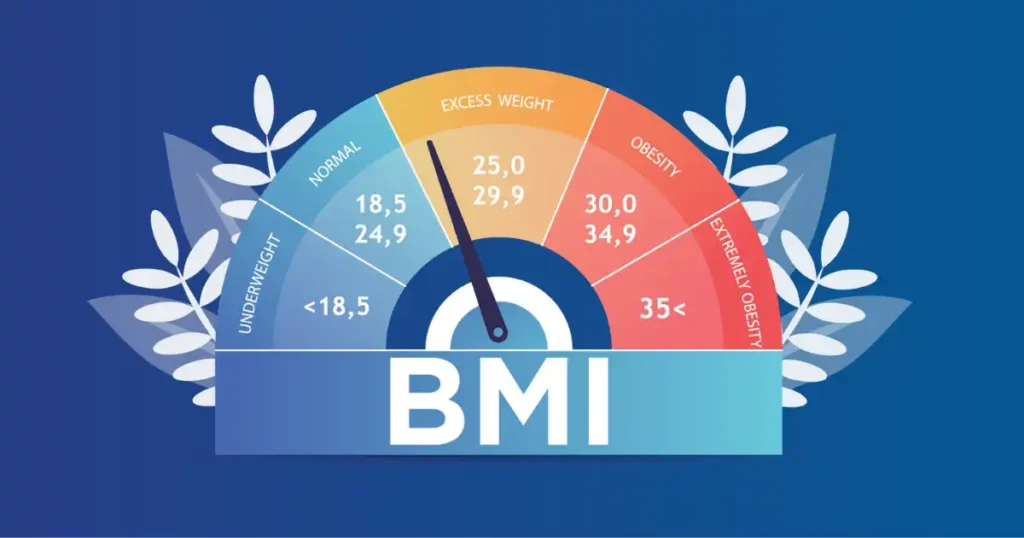
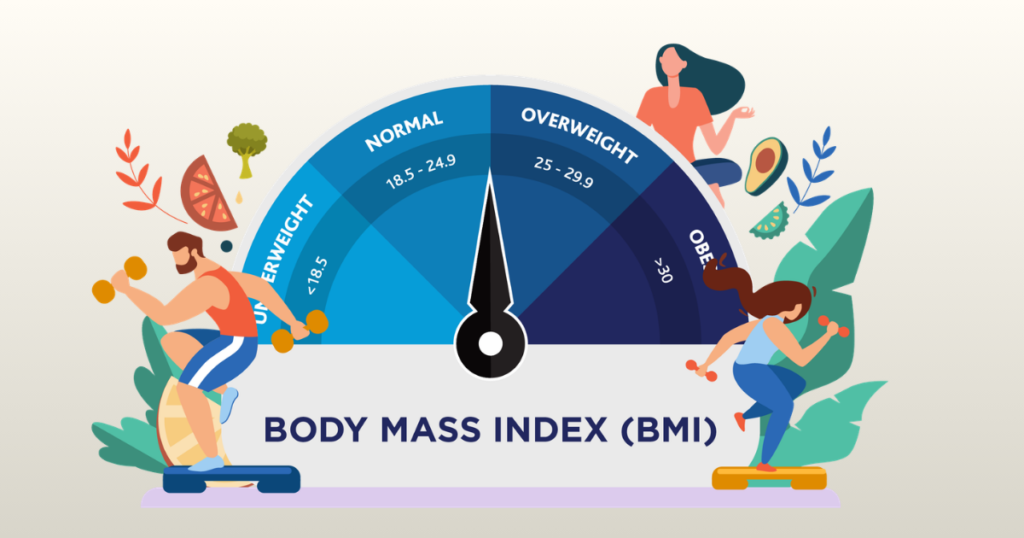
The table below shows the standard BMI categories used in global health guidelines. Adding something like this near your calculator gives users the context they need right away.
| BMI Range | Category | Health Meaning |
| Below 18.5 | Underweight | Possible nutritional deficiency |
| 18.5 to 24.9 | Normal weight | Healthy range |
| 25 to 29.9 | Overweight | Increased health risk |
| 30 and above | Obese | Higher risk of chronic disease |
When I helped a small wellness site redesign their calculator page, this category table became the most bookmarked section on the whole page. People want to understand their number, not just see it.
Methods to Embed a BMI Calculator on Your Website
There are a few different ways to get a calculator onto your site. The right one depends on your tech skills and what platform you are using.
Method 1: HTML and JavaScript Calculator
This is the most flexible option. If you or a developer can write a bit of code, building your own calculator gives you complete control over the look, feel, and function.
The basic structure involves adding HTML input fields for height and weight, writing a short JavaScript function that runs the BMI formula, and displaying the result dynamically on the page without a reload. You can style it however you like with CSS.
This method works great for custom websites or developers who want to match the calculator exactly to their brand.
Method 2: Embed via iFrame Tool
This is the simplest option for non-technical users. Many free BMI calculator providers let you copy a short embed code and paste it into any web page editor.
You paste the code, publish the page, and the calculator is live. No coding required. The downside is less control over styling. But for bloggers and small site owners who just want the tool working fast, this is a perfectly good option.
Method 3: WordPress Plugin
If your site runs on WordPress, plugins are your best friend. There are several free and paid plugins that add calculator widgets without any coding at all.
With tools like Elementor, you can drag and drop a calculator block right onto your page. You customize the colors, fonts, and layout through a visual editor. The plugin handles all the code in the background.
This is the most beginner-friendly method and works well for most health bloggers and small clinic sites.
Example Code for a Simple BMI Calculator
For those of you who want to build your own, here is a basic overview of what the code structure looks like. You do not need to be an expert developer. The logic is straightforward.
Basic HTML Structure
You need four elements: a height input field, a weight input field, a button to trigger the calculation, and a result display area. Each input should have a clear label. The button should say something action-oriented like Check Your BMI.
JavaScript Calculation Logic
The JavaScript function fires when the user clicks the button. It reads the height and weight values, converts units if needed (for example, converting feet and inches to meters), runs the BMI formula, and then writes the result and category label into the display area.
Keep the code lean. A BMI calculator does not need hundreds of lines of JavaScript. The core logic is about ten to fifteen lines.
Styling with CSS
Clean design matters more than you think. I once tested the same calculator on two versions of a health blog. One had a cluttered layout with bright red buttons everywhere. The other was simple, with white space and soft colors. The clean version had nearly double the interaction rate.
Keep input fields large and easy to tap on mobile. Use soft, health-related colors like greens and blues. Make the result stand out with a slightly larger font or a colored background.
Best Embeddable BMI Calculator Tools Online
If you do not want to build from scratch, there are some solid third-party tools that let you embed a polished calculator quickly. Here is a quick comparison of popular options.
| Tool | Best For | Key Feature |
| Outgrow | Lead generation | Interactive calculators with email capture |
| Elfsight | Easy embedding | Widget customization with live preview |
| Calculator.net | Simple embed | Free iframe code, no account needed |
| ConvertCalculator | Marketing funnels | Data capture and CRM integrations |
Each of these tools has a free tier or a trial. Test a few before committing. Look at how the result looks on mobile, since that is where most of your visitors are coming from.
Design Tips to Make Your BMI Calculator More Engaging
A boring calculator gets ignored. A well-designed one becomes a small experience that visitors remember. Here are the design tips that have made the biggest difference in my work.
Use Friendly Language
Words matter. The label on your calculator and the button text can either push people away or draw them in.
Instead of a generic label like Calculate BMI, try something warmer: Check Your Body Mass Index in 5 Seconds. That framing sets an expectation and reduces friction. It tells users the process is quick and easy.
After the result, use supportive language. If someone is in the normal range, say something like you are in a healthy weight range, keep it up. If they are outside the healthy range, keep the tone gentle and point them to resources rather than alarming them.
Add Visual BMI Charts
A number alone does not mean much to most people. A visual scale that shows where they fall makes the result much more meaningful.
A simple horizontal bar chart with color-coded zones, from underweight to obese, helps users instantly see where their BMI sits relative to the healthy range. It brings together concepts from body composition science and nutrition science in a visual that takes two seconds to understand.
Provide Helpful Health Tips
Right below the result, add a short section with two or three practical tips. If the person is in the overweight category, share a simple exercise suggestion and a hydration reminder. If they are underweight, point them toward nutrient-dense food ideas.
These tips keep users on your page longer, and they add real value. That combination is exactly what turns a casual visitor into a loyal reader.
Expert Advice from a U.S. Health Professional
Numbers can be misleading without context. I want to share a perspective from an actual medical professional here.
Dr. Michael Jensen, a specialist in metabolism and nutrition, puts it this way: BMI calculators are great screening tools, but they should not replace a real conversation with your doctor. Use them as a starting point, not a final answer.
That advice is worth putting right on your calculator page. A short disclaimer near the result, something like this tool is for general wellness awareness and is not a substitute for medical advice, protects your visitors and adds credibility to your site.
A clinic website in Minnesota added a BMI calculator so patients could check their number before appointments. It gave doctors a starting point for conversations about overall health goals. Simple tool, real-world impact.
Common Mistakes When Adding a BMI Calculator
I have seen plenty of well-meaning site owners set up a calculator and then wonder why nobody uses it. Usually, the problem is one of these three mistakes.
Hiding the Tool Deep in the Website
If visitors have to dig through five pages to find your calculator, most of them will not bother. Put it where people can see it.
The best locations are the homepage as a small widget, a dedicated tools or resources page, a sidebar on health-related posts, or right inside blog posts about weight, fitness, or nutrition. The closer it is to the content your visitors are already reading, the more they will use it.
Not Explaining BMI Results
Showing a number without context is a missed opportunity. If someone gets a result of 27.4 and there is nothing else on the page, they will leave wondering what to do next.
Always include the BMI category table. Add a short paragraph explaining what the range means. Point them toward next steps, whether that is talking to a doctor, adjusting their diet, or starting a fitness routine.
Ignoring Mobile Optimization
Over 70 percent of health-related searches happen on phones. If your calculator is hard to use on a small screen, most of your visitors will give up before they get their result.
Test your calculator on multiple device sizes before publishing. Make sure the input fields are large enough to tap easily, the font is readable, and the result displays cleanly. A broken mobile experience is worse than no calculator at all.
SEO Tips for Pages With BMI Calculators
Adding the tool is step one. Making sure people can find it through search is step two. Here is how to optimize your BMI calculator page for search traffic.
Target Long-Tail Keywords
Most people searching for a BMI calculator are looking for something specific. They type phrases like BMI calculator for women, free BMI calculator in metric units, healthy weight calculator online, or BMI calculator with age and gender.
These long-tail queries have less competition than broad terms. A focused calculator page with good content can rank for dozens of them at once. Use them naturally in your headings and page copy. Do not force them in.
Add Supporting Content
A page with just a calculator and nothing else will not rank well. Surround the tool with helpful content. Explain what BMI is, what the categories mean, and when someone should talk to a doctor about their number.
Cover related topics like body composition, healthy weight ranges, and nutrition basics. This supporting content gives search engines more signals about what your page is about, and it gives visitors more reasons to stay and read.
Internal Linking Strategy
Your BMI calculator page should not sit in isolation. Link it to related content on your site. If you have articles about healthy diets, workout plans, calorie counting, or body fat analysis, link to them from your calculator page and link back to the calculator from those articles.
This internal linking structure helps search engines crawl your site more effectively and keeps visitors moving through your content rather than bouncing off after one page.
When a BMI Calculator Might Not Be Accurate
I always make a point of including this section on any site I work with. BMI is a useful tool, but it is not perfect. Visitors deserve to know its limits.
| Scenario | Why BMI May Be Wrong |
| Athletes and highly muscular individuals | High muscle mass raises BMI without raising health risk |
| Pregnant women | Weight changes are expected and healthy during pregnancy |
| Children and teenagers | Different growth standards apply for younger people |
| Older adults | Muscle loss with age can make BMI misleading |
| People with high bone density | More weight without more fat can skew results |
In my experience working with personal trainers and fitness coaches, many of them pair BMI with a waist circumference measurement or a body fat percentage reading to get a fuller picture of someone’s health. BMI is the starting point, not the whole story.
Future Trends for Interactive Health Tools on Websites
The simple BMI calculator is just the beginning. Health websites are getting smarter, and the tools on them are evolving fast.
AI-Powered Health Widgets
Artificial Intelligence is starting to show up in health tools. Instead of just getting a number, users might soon get a personalized health summary based on their BMI, age, activity level, and other factors. AI-driven tools can tailor recommendations in a way that a static calculator never could.
If you are building a health website for the long term, think about how AI-powered widgets might fit into your toolkit over the next few years.
Personalized Health Dashboards
Some websites are moving beyond single calculators toward full health dashboards. A user can enter their data once and see their BMI, ideal calorie intake, daily water needs, and recommended macros all in one place.
This kind of tool dramatically increases session time and gives visitors a strong reason to bookmark and return to your site.
Multi-Calculator Health Tools
Many health sites are bundling calculators together. A BMI calculator sits alongside a calorie calculator, a body fat percentage tool, a daily water intake calculator, and a macro calculator. Visitors get a full health snapshot in one visit.
This approach builds authority in the health and fitness space. It positions your site as a go-to resource rather than a single-use tool page.
How to Turn Your BMI Calculator Into a Lead Generator
Smart site owners use tools for more than just engagement. A well-designed BMI calculator can also help you grow your email list and connect visitors with your services.
Add Email Capture
After a visitor gets their BMI result, give them an option to receive more. Something like: send me my BMI results along with a free healthy eating guide. That small offer converts a one-time visitor into a subscriber.
Keep the opt-in completely optional. Never require an email to see the result. That kind of friction will hurt your interaction rate and frustrate visitors. Make it a soft offer that adds value.
Offer Personalized Reports
Take the email capture one step further. Create a simple downloadable report based on the user’s BMI result. If someone is in the overweight range, send them a PDF with five practical steps to reach a healthier weight. If they are in the normal range, send a maintenance guide.
These personalized reports feel high-value and relevant. They are far more effective than a generic newsletter signup.
Connect With Fitness Programs
If you offer coaching, workout plans, or meal planning services, your calculator result page is the perfect place to promote them. After showing the result, add a soft call to action. Something like: ready to take the next step? Check out our 8-week fitness program.
The visitor is already in a health mindset. They just learned something meaningful about their body. That is the ideal moment to show them how you can help them take action.
Final Recommendation
After years of working with health blogs, gym websites, and clinic portals, my recommendation is simple. If your website is in the health, fitness, or wellness space, add an embeddable BMI calculator for websites as soon as possible.
Start with a clean, mobile-friendly embed or a WordPress plugin if you are not a developer. Give the result real context with a BMI category table and a short explanation. Add a soft email capture option. Link the page to your other health content. And include a clear disclaimer that the tool is for general wellness awareness only.
You do not need a big budget or a development team. You need a tool that works, a page that explains it well, and content that gives visitors a reason to stay and explore.
The gym blog in Denver I mentioned at the start of this guide? They kept that calculator page updated, added a short FAQ section below it, and linked it from every post about weight loss and fitness. Two years later, it was still one of the highest-traffic pages on their site. That is the power of a simple, well-placed interactive tool.
Take the first step today. Add the calculator. Make it useful. Watch what it does for your engagement and your rankings.
Frequently Asked Questions
1. What is an embeddable bmi calculator for websites?
It is a small tool you add to your site. An embeddable bmi calculator for websites lets your users check their health score right on your own page.
2. Is it hard to add an embeddable bmi calculator for websites?
Not at all. Most tools give you a simple code. You just paste it to use an embeddable bmi calculator for websites on any page you want.
3. Will an embeddable bmi calculator for websites slow my site?
Good tools are very light. Using a fast embeddable bmi calculator for websites keeps your page quick. It provides a smooth path for all your guests.
4. Can I style an embeddable bmi calculator for websites?
Yes, many allow you to change colors. You can make an embeddable bmi calculator for websites match your brand. It will look great on your screen.
5. Why use an embeddable bmi calculator for websites for SEO?
It keeps people on your site longer. A top embeddable bmi calculator for websites adds value. This helps your search rank grow over time with ease.
6. Is an embeddable bmi calculator for websites mobile friendly?
Most modern tools work well on phones. An embeddable bmi calculator for websites should look good on all screens. This helps users stay happy and active.
7. Where can I find an embeddable bmi calculator for websites?
Many health sites offer them for free. Look for a trusted embeddable bmi calculator for websites today. It is a smart way to grow your online community.

Shakitul Alam is the CEO, Owner, and Co-founder of BMI Calculator Women AI. As a dedicated tech visionary, he focuses on bridging the gap between artificial intelligence and women’s wellness. Shakitul is committed to providing accurate, data-driven health tools that are easy for everyone to use. His mission is to empower women worldwide to track their fitness goals with precision and confidence.