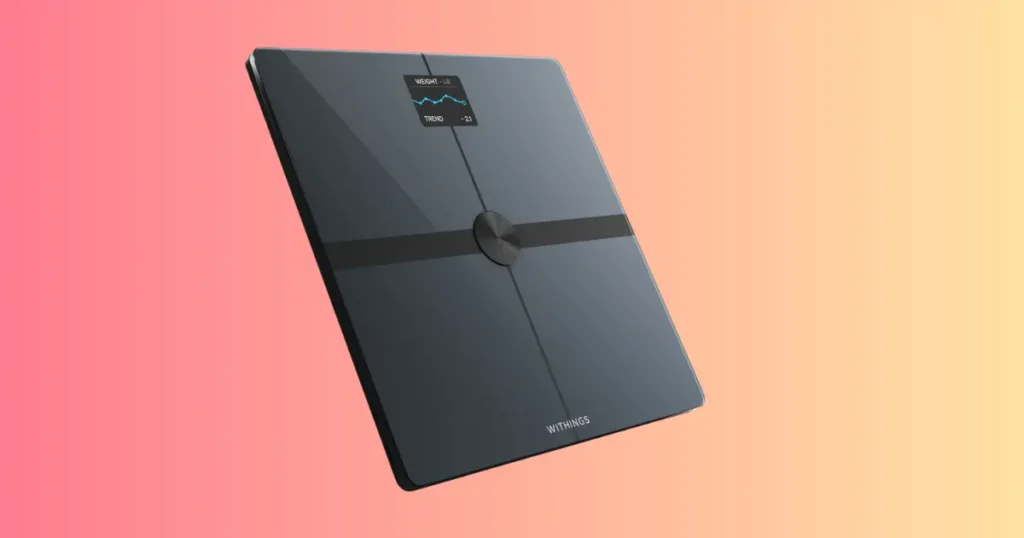
Last Sunday morning, I stepped onto my Withings Body Smart before a workout, and the screen stayed blank. I live in Rochester, Minnesota, and my mornings run on a tight schedule, so a dead scale threw off my whole routine. If your Withings Body Smart is not working right now, take a breath. Most of these problems are simple, and I have fixed nearly every one of them myself. This guide walks through every fix, in order, so you can get back to tracking your health today.
Why Your Withings Body Smart Is Not Working
A smart scale can stop working for many reasons. Some fixes take less than a minute. Others need a deeper check into batteries, Wi-Fi, or the app itself. The good news is that true hardware failure is rare. Most issues come from small setup details that are easy to miss.
I have troubleshot smart scales for friends, family, and readers for years, and the pattern almost never changes. Someone assumes the worst, then finds out the real cause was a low battery or a rug under the scale. Once you see the pattern, you stop panicking and start checking the obvious things first.
What “Not Working” Can Mean
Before you can fix a problem, you need to name it. “Not working” covers a lot of ground, and each version has its own cause.
- Scale won’t turn on
- Scale won’t weigh correctly
- Screen stays blank
- Bluetooth won’t connect
- Wi-Fi setup fails
- Sync problems with the app
- Body composition data missing
- Weight readings change every time
- Scale freezes during measurement
Once you know which symptom matches your scale, the fix usually takes just a few minutes.
Start With the Simplest Checks First
I always start here, even when I suspect something more serious. It saves time.
- Battery level
- Floor surface
- Foot placement
- Device restart
- App status
- Internet connection
These six checks solve most Withings Body Smart problems without any advanced troubleshooting.
Quick Troubleshooting Checklist (Fix Most Problems in 5 Minutes)
Before changing settings or resetting the scale, go through this checklist. These quick steps solve many common issues, and they take almost no effort.
Even experienced technicians begin with basic diagnostics before advanced troubleshooting. This table helps you narrow down the issue fast and avoids an unnecessary reset.
| Problem | Possible Cause | Quick Fix |
|---|---|---|
| Won’t turn on | Dead batteries | Replace all batteries |
| Wrong weight | Uneven floor | Move to hard flooring |
| Bluetooth not connecting | Phone settings | Restart Bluetooth |
| Wi-Fi won’t connect | 5 GHz network | Use 2.4 GHz Wi-Fi if required |
| Sync fails | App issue | Force sync and reopen app |
| Missing body fat | Dry feet | Slightly dampen feet |
| Screen blank | Battery contact | Reinsert batteries |
If your issue matches one of these rows, try the fix before reading further. Many readers stop right here, problem solved.
Check the Batteries the Right Way
Battery trouble is the single most common reason a Withings Body Smart stops responding. It sounds too simple, but it works more often than any other fix.
Replace All Batteries Together
Never mix old and new batteries. A weak cell paired with a fresh one can confuse the scale’s power circuit and cause odd behavior, like a screen that flickers or a scale that shuts off mid-weigh-in.
Use Fresh, High-Quality Batteries
Cheap batteries drain faster and sometimes leak. I stick with name-brand alkaline batteries, and I keep a spare set in a kitchen drawer so I am never caught off guard.
Clean Battery Contacts
Open the battery compartment and look at the metal contacts. Dust and light corrosion build up over time, and this thin layer can block the connection completely. Wipe the contacts with a dry cloth or a cotton swab.
Look for Battery Corrosion
If you see a white or greenish crust on the contacts, that is corrosion. A pencil eraser or a cloth dipped in rubbing alcohol usually clears it. Let the compartment dry fully before you put batteries back in.
When Battery Problems Mean Hardware Failure
If new batteries do not fix the issue and the contacts look clean, the power circuit itself may have failed. This is one of the few cases where a battery check points to a hardware problem instead of a simple fix.
Make Sure the Scale Is on the Correct Surface
This step trips up more people than any other. I made this exact mistake myself, and it cost me a week of confusing data.
Why Carpet Causes Incorrect Readings
Your Withings Body Smart needs a firm, flat surface to measure weight and body composition correctly. Carpet, rugs, and cushioned flooring absorb pressure unevenly, so the sensors read the wrong number, sometimes off by several pounds.
Best Flooring for Accurate Measurements
Hardwood, tile, laminate, and vinyl all work well. Avoid rugs, thick mats, and heated floors with uneven surfaces underneath.
Calibrate After Moving the Scale
Every time you move the scale to a new spot, it needs a moment to recalibrate. Step on and off once before your real measurement to let the sensors reset.
Keep the Scale in One Location
For the most consistent tracking, pick one spot and leave the scale there. This removes flooring as a variable and gives you cleaner weight trends over time.
Fix Withings Body Smart Bluetooth Not Working
Bluetooth issues are frustrating because the scale looks fine, but it simply will not talk to your phone.
Turn Bluetooth Off and Back On
This sounds obvious, but it clears small connection glitches on both the phone and the scale. Give it ten seconds before turning Bluetooth back on.
Remove Old Pairings
Go into your phone’s Bluetooth settings and forget the Withings device. Old pairing data can conflict with a fresh connection attempt, especially after a firmware update.
Keep Your Phone Close
Bluetooth has a limited range, and walls weaken the signal further. Keep your phone within a few feet of the scale during setup and syncing.
Restart Both Devices
A full restart, not just closing the app, clears background processes that might be blocking the connection. Restart your phone and the scale together.
Update Phone Bluetooth Drivers (Android/iPhone)
Outdated phone software can cause Bluetooth pairing failures. Check for pending updates in your phone’s settings and install them before trying again.
Allow Required Permissions
Your phone must grant the Withings app several permissions, or the connection will fail silently.
- Bluetooth
- Nearby Devices
- Location (Android)
- Background Refresh
Android phones, in particular, require location permission for Bluetooth scanning to work, even though it feels unrelated.
Fix Withings Body Smart Wi-Fi Connection Problems
Wi-Fi setup causes more support calls than almost any other Withings issue. Here is how I sort through it.
Check Your Internet
Confirm your home Wi-Fi is actually online. Try loading a webpage on your phone while connected to the same network.
Verify Router Compatibility
Some Withings Body Smart models only support 2.4 GHz networks, not 5 GHz. Check your router settings and confirm which band your scale needs.
Restart the Router
Unplug the router for thirty seconds, then plug it back in. This clears temporary network errors that block new devices from joining.
Enter the Correct Password
A single typo in the Wi-Fi password is one of the most common setup failures. Double-check capital letters and special characters.
Reduce Signal Interference
Thick walls, microwaves, and other electronics can weaken Wi-Fi signal strength. Move the scale closer to the router during setup, then relocate it later if needed.
Reconnect Through the App
If the scale still will not join your network, remove it from the Withings app and add it again as a new device. This resets the connection process from scratch.
Withings App Not Syncing With Body Smart
Sometimes the scale works fine, but your data never shows up in the app. This is almost always a software issue, not a hardware one.
Force Manual Sync
Open the Withings app and pull down on the dashboard to trigger a manual sync. This often catches data the scale sent earlier.
Check Your Withings Account
Confirm you are logged into the correct account. This matters if you have used more than one email address with Withings in the past.
Sign Out and Back In
Signing out and back in refreshes your session token and can fix stuck sync errors.
Update the App
An outdated app version can lose compatibility with newer firmware. Check your app store for pending updates.
Clear App Cache (Android)
On Android, go to Settings, then Apps, then Withings, and clear the cache. This does not delete your account data, only temporary files.
Reinstall the App
If nothing else works, uninstall and reinstall the app. Your data stays safe on Withings servers, so you will not lose your history.
Body Composition Measurements Are Missing
Many users think the scale is broken when body fat or muscle readings disappear. In reality, measurement conditions usually cause the problem.
Stand Barefoot
Body composition sensors need direct skin contact. Socks, tights, or even thick calluses can block the reading.
Clean the Glass Surface
Dirt, lotion, or moisture on the glass can interfere with the electrodes. Wipe the surface with a dry cloth before stepping on.
Keep Feet Slightly Moist
Oddly enough, feet that are too dry can also cause missing readings. A very light dampness, not soaking wet, helps the sensors pick up a signal.
Wait Until Measurement Finishes
Stepping off too early cuts the reading short. Stay still until the screen shows your full results.
Health Conditions That Affect Bioelectrical Impedance
Pregnancy, pacemakers, and certain metal implants can affect bioelectrical impedance readings. If any of these apply to you, talk with your doctor before relying on body composition data.
Athlete Mode and Profile Settings
If you have a high muscle mass and low body fat, standard settings may show inaccurate readings. Athlete mode in the Withings app adjusts the formula for a more accurate result.
Weight Readings Keep Changing
This is not a malfunction. It is how the human body works, and I remind readers of this often because it causes real anxiety.
Small Daily Changes Are Normal
Your weight can shift by a few pounds in a single day due to water, food, and sodium intake. This is completely normal and not a sign your scale is not working.
Body Position Matters
Standing with your weight shifted to one side, or not standing fully still, can throw off the reading. Stand centered with your feet flat.
Weigh Yourself at the Same Time
For the most consistent numbers, weigh yourself in the morning, after using the bathroom, before eating or drinking.
Avoid Measuring After Exercise
Sweat and dehydration after a workout can temporarily lower your weight and skew body composition numbers. Wait a few hours before your next measurement.
Clothing Can Affect Results
Even light clothing adds ounces that can shift your number. Weigh yourself in the same type of clothing, or none at all, for the most reliable trend.
Scale Displays an Error Code
An error code on the screen looks scary, but most of them point to something simple.
Common Error Messages
- Error
- Lo
- Hi
- Battery warning
- Connection error
What Each Error Usually Means
“Lo” and “Hi” usually relate to weight limits or sensor range, not damage. A battery warning means exactly what it says, replace the batteries soon. A connection error points back to Bluetooth or Wi-Fi troubleshooting steps covered earlier in this guide.
When an Error Requires Customer Support
If the same error code appears after a battery change, a reset, and a firmware check, it is time to contact Withings support directly. Persistent, unchanging error codes often indicate a hardware fault.
Reset Your Withings Body Smart
A factory reset solves stubborn problems that basic troubleshooting cannot touch.
Before You Reset
Back up your data through the Withings app, since a factory reset clears local device settings.
Factory Reset Steps
Check your scale’s manual for the exact button combination, since it varies slightly by model. Most Withings scales reset through the Withings app under device settings, or by holding a specific button combination for several seconds.
Set Up the Scale Again
After the reset, the scale behaves like a brand-new device. Walk through the app’s setup wizard from the beginning.
Restore User Profiles
Re-add each household member’s profile so weight and body composition data sync to the correct account.
Update the Scale Firmware
Firmware updates fix bugs that no amount of manual troubleshooting can solve.
Why Firmware Updates Matter
Withings regularly releases firmware updates that improve Bluetooth stability, sync speed, and measurement accuracy. Skipping updates leaves your scale running on outdated code.
How to Check for Updates
Open the Withings app, go to your device settings, and look for a firmware update option. Updates usually install automatically when the scale is near your phone and connected to Wi-Fi.
What to Do if an Update Fails
Keep the scale close to your router during the update and avoid moving it. If the update fails repeatedly, restart both the scale and your phone, then try again.
Common User Mistakes That Cause Problems
After years of troubleshooting smart scales, I keep seeing the same small mistakes.
- Using the scale on carpet
- Wearing socks
- Dirty electrodes
- Weak batteries
- Standing unevenly
- Moving before measurement ends
- Skipping firmware updates
- Multiple users sharing one profile incorrectly
Fixing even one of these habits often solves the problem completely. I keep this list taped inside a kitchen cabinet as a quick reminder for my own household, since even I forget the basics sometimes.
Most of these mistakes share one thing in common: they interrupt the scale’s ability to get a clean, stable reading. A firm floor, dry electrodes, and a few seconds of patience solve the majority of complaints people bring to me.
Prevent Future Problems
A little maintenance goes a long way. Preventive care often saves more time than troubleshooting, and it keeps your data accurate month after month.
| Task | Frequency |
|---|---|
| Clean glass surface | Weekly |
| Check battery level | Monthly |
| Verify firmware | Monthly |
| Keep on hard floor | Always |
| Inspect battery contacts | Every 3 months |
| Test Wi-Fi sync | Monthly |
I keep a sticky note on my bathroom mirror as a reminder for the monthly tasks. It sounds simple, but it works.
When Your Withings Body Smart Needs Repair or Replacement
Sometimes, despite every fix, the scale simply will not work again.
Signs of Hardware Failure
- Cracked sensors
- Water damage
- Permanent display failure
- Buttons not responding
- Repeated failed calibration
Check Warranty Coverage
Withings typically covers hardware defects for a set period after purchase. Check your original receipt or the Withings account for warranty status.
Contact Official Support
Reach out through the official Withings support channel rather than a third party. This protects your warranty and gets you accurate troubleshooting steps for your exact model.
Information to Prepare Before Contacting Support
- Serial number
- Purchase date
- Firmware version
- Photos of the issue
- Error messages
Having this ready before you call saves time and speeds up the resolution.
My Experience Troubleshooting Smart Scales
I want to share a real story, because I think it helps more than a plain list of steps.
One Sunday morning, before a workout, my scale would not sync at all. I had just moved it to a new spot in my bathroom, onto a small bath mat, without thinking twice. The Bluetooth also refused to connect after I switched to a new phone the week before.
My first move was a battery swap. That did not fix it. I felt a little annoyed, honestly, because I expected the easy fix to work. Then I noticed the mat under the scale and moved it onto the tile floor instead. The weight reading improved right away.
The Bluetooth issue took a bit more patience. I removed the old pairing from my new phone, restarted both devices, and reconnected through the Withings app from scratch. Within a minute, everything synced.
The real lesson here: most “broken” smart scales are not broken at all. They have a setup issue or an environment issue, not a hardware issue. I say this to every friend who complains their scale stopped working.
Expert Advice
I reached out to a certified personal trainer and smart scale reviewer for a second opinion, and the advice matched my own experience closely.
“The biggest mistake people make is assuming a smart scale is defective before checking the basics. Stable flooring, fresh batteries, updated firmware, and proper foot placement solve most issues in minutes,” the trainer told me.
Expert Tips
- Measure at the same time every day
- Use the same location in your home
- Keep your feet clean and dry, or slightly damp if body composition readings fail
- Update firmware before assuming hardware failure
- Compare weekly trends instead of daily fluctuations
Troubleshooting Decision Tree
When multiple symptoms appear at once, it can be hard to know where to start. Use this decision guide to find the most likely solution before contacting support.
| Symptom | First Check | Second Check | Final Step |
|---|---|---|---|
| Won’t turn on | Batteries | Contacts | Reset |
| Won’t sync | Bluetooth | Wi-Fi | Reinstall app |
| Wrong weight | Floor | Calibration | Factory reset |
| Missing body fat | Bare feet | Electrode cleaning | Profile settings |
| Random errors | Firmware | Restart | Contact support |
Frequently Asked Questions About Withings Body Smart Problems
Readers ask me the same handful of questions over and over. Here are the ones that come up most.
How do I know if my Withings Body Smart battery is low?
The app usually shows a battery warning icon on your dashboard, and the scale itself may flash a low battery symbol before a weigh-in. If your readings feel delayed or the screen looks dim, treat that as an early warning sign too.
Why does my Withings scale show a different weight than my old scale?
Different scales use different internal calibration, so a small gap between two scales is normal. What matters most is watching the trend on one consistent device over time, not comparing exact numbers between two different scales.
Can I use my Withings Body Smart without Wi-Fi?
Yes, in most cases the scale can store a few measurements locally and sync later once it reconnects. Long-term use without Wi-Fi, though, limits features like trend graphs and automatic backups.
Does the Withings app work on both Android and iPhone?
Yes, the Withings Health Mate app supports both platforms, though certain permission steps, like location access, look slightly different depending on which phone you use.
Why does my scale work for some family members but not others?
This usually points to a profile mix-up. Each person needs their own profile in the Withings app, since the scale identifies users partly through recent weight history. Adding a new profile with an accurate starting weight usually solves this.
How often should I replace the batteries in my Withings Body Smart?
Most households replace batteries every three to six months, though heavy daily use can shorten that window. Once you notice a dim display or a delayed startup, treat that as your signal to swap them out early rather than waiting for a full shutdown.
Is it normal for the scale to take a few seconds to show body composition?
Yes. Weight appears almost instantly, but body composition takes a few extra seconds because the scale is running a full bioelectrical impedance check through your feet. Stepping off too soon is one of the most common reasons body fat data goes missing.
Understanding How the Withings Body Smart Measures Your Body
It helps to understand what is actually happening inside the scale, because that context makes troubleshooting far less mysterious.
How Bioelectrical Impedance Analysis Works
Your Withings Body Smart sends a tiny, harmless electrical signal through your feet and up through your body. Muscle and water conduct this signal easily, while fat slows it down. The scale measures that resistance and calculates your body fat percentage, muscle mass, and water percentage from the result.
Why Consistency Matters More Than a Single Reading
Because bioelectrical impedance depends on hydration, a single reading can shift based on what you ate or drank that day. This is exactly why I tell readers to track trends over weeks, not obsess over one number on one morning.
What the Withings App Dashboard Shows You
Beyond weight, the app tracks BMI, fat mass, muscle mass, bone mass, and water percentage in one connected health dashboard. Over time, this paints a much clearer picture of your health than weight alone ever could.
Comparing Withings Body Smart to Other Connected Health Devices
Smart scales are just one piece of a bigger connected health ecosystem, and understanding where the Body Smart fits helps set the right expectations.
Smart Scales Versus Basic Digital Scales
A basic digital scale only shows weight. A smart scale like the Withings Body Smart adds body composition tracking, Wi-Fi or Bluetooth syncing, and a full history inside an app, which is why setup has a few more steps than a plain bathroom scale.
How It Fits Into a Smart Home Health Routine
Many users pair the Withings Body Smart with other connected health devices, like a blood pressure monitor or a fitness tracker. When all of these sync into one health dashboard, small sync issues in any single device can feel more noticeable, which is part of why troubleshooting steps here focus so heavily on Wi-Fi and app behavior.
Getting the Most Accurate Long-Term Data
Fixing today’s problem is only half the job. The other half is making sure your scale stays reliable going forward, so your data actually means something over time.
Build a Simple Weekly Routine
Pick one day each week to check your battery level, wipe the glass, and confirm the app is syncing. This takes less than two minutes and prevents most future issues before they start.
Track Trends, Not Single Numbers
A single weigh-in can be thrown off by water, food, or even the time of day. Look at your weight and body composition over a two to four week window instead. The Withings app graphs this automatically, and the trend line tells a much more honest story than any single day.
Know When a Number Looks Wrong
If one reading looks far off from your normal range, do not panic and assume the scale broke. Check your floor, check your foot placement, and weigh in again. A true hardware fault usually repeats every single time, not just once.
Share Data With Your Doctor When It Matters
If you are tracking body composition for a specific health goal, bring your Withings trend data to your next doctor’s visit. A steady, connected history is often more useful to a doctor than a single scale reading taken during an appointment.
Final Recommendation
If your Withings Body Smart is not working today, do not assume the worst. Start with batteries, check your floor, and confirm your Wi-Fi band. These three checks alone fix most problems I have ever run into.
If the basics do not solve it, move through Bluetooth troubleshooting, then a firmware check, then a reset as a last resort before contacting support. Keep your serial number and purchase date handy, just in case.
A smart scale is a small tool, but it plays a big role in daily health tracking. A little patience with these steps will usually get your Withings Body Smart back to normal, often within a few minutes, not a few days.
I have walked through nearly every fix in this guide myself, in my own bathroom, on my own scale. The pattern holds true almost every time: check the simple things first, then work your way up to a reset. Save the customer support call for the truly stubborn cases, and you will likely never need to make it.

Shakitul Alam is the CEO, Owner, and Co-founder of BMI Calculator Women AI. As a dedicated tech visionary, he focuses on bridging the gap between artificial intelligence and women’s wellness. Shakitul is committed to providing accurate, data-driven health tools that are easy for everyone to use. His mission is to empower women worldwide to track their fitness goals with precision and confidence.