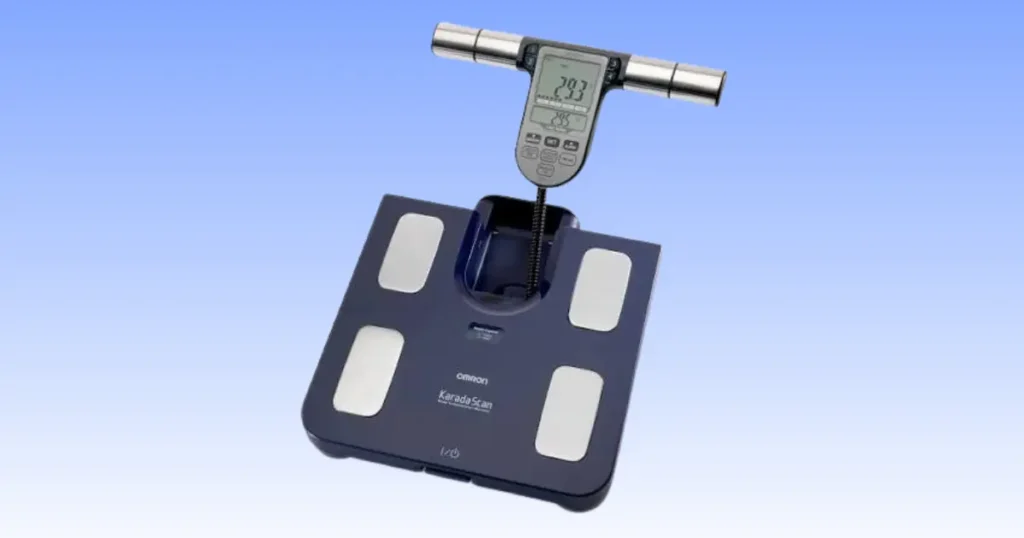
My scale flashed a blank screen on a Tuesday morning, and I almost tossed it in the trash. Then I remembered I had swapped in two old batteries instead of four fresh ones the week before. That small mistake taught me a big lesson about this device. Most of the time, when your Omron BF511 is not working, the fix is simple and sits right in front of you. In this guide, I will walk you through every issue I have run into, plus the ones readers ask me about most, from power problems to error codes to strange body fat numbers.
The Omron BF511 has earned its spot as one of the most trusted body composition monitors for home use. It is not fancy, but it is reliable, and that reliability is exactly why a sudden glitch feels so frustrating. You expect it to just work. This guide covers power issues, error messages, sensor problems, inaccurate readings, cleaning and maintenance, and the point where you should stop troubleshooting and call in a professional. I will not throw random fixes at you. Instead, we will work through a clear, step by step process so you can find your answer fast.
How the Omron BF511 Works
Understanding how this scale reads your body makes every fix on this page easier to grasp. You do not need an engineering degree. You just need the basics.
Bioelectrical Impedance Analysis (BIA) Explained
The BF511 uses a method called bioelectrical impedance analysis, or BIA. It sends a very mild, safe electrical signal through your body and measures how much resistance that signal meets. Muscle holds more water than fat, so it conducts electricity more easily. Fat slows the signal down. The scale uses that resistance pattern, along with your age, height, and gender, to estimate your body composition.
Why Hand and Foot Electrodes Matter
This is the part people miss most often. The BF511 does not just weigh you from the feet up. It also asks you to hold a handgrip unit. That signal has to travel from your hands, through your torso, and down to your feet. If either the hand or foot electrodes lose contact, even for a second, the reading will fail or come out wrong. Clean, dry, and steady contact matters more than almost anything else you will read in this article.
Measurements the BF511 Calculates
Here is what the device gives you in a single scan:
- Weight
- Body fat percentage
- Skeletal muscle percentage
- BMI
- Visceral fat level
- Resting metabolism
Each of these depends on accurate electrode contact and a correctly set personal profile. Get those two things right, and most of your accuracy problems disappear.
Start Here: 60-Second Quick Troubleshooting Checklist
Before you assume your Omron BF511 is broken, run through this checklist. I use this exact list myself whenever a reading looks off, and it solves the issue about eight times out of ten.
Make Sure the Batteries Are Fresh
Weak batteries cause more BF511 problems than any other single factor. Replace all four AA batteries as a set, never just one or two.
Place the Scale on a Hard, Flat Floor
Carpet, rugs, and uneven tile throw off the weight sensors and can prevent the unit from powering on correctly.
Clean the Electrodes
Lotion, sweat, and dust build up on the metal plates. A quick wipe with a slightly damp cloth restores good contact.
Remove Socks
Bare feet are required. Socks, tights, and even damp feet from a shower can block the signal.
Hold the Display Unit Correctly
Grip the handgrip firmly with both hands, keeping your arms extended and away from your body.
Stand Still Until Measurement Finishes
Movement during the scan is one of the top reasons for an error message. Stay still until you hear or see the result.
Omron BF511 Won’t Turn On
It is unsettling to press the power button and get nothing back. The good news is that a dead screen almost always points to something fixable rather than a broken device.
Dead Batteries
This is the number one cause. Replace all four AA batteries together, and avoid mixing old batteries with new ones. Mixed batteries drain unevenly and can cause power to cut out mid use.
Batteries Installed Incorrectly
Double check the plus and minus markings inside the battery compartment. It is an easy step to rush through, especially in a dim bathroom.
Dirty Battery Contacts
Metal contacts can develop a thin layer of oxidation over time. Gently wipe them with a dry cotton swab or a pencil eraser to restore a clean connection.
Battery Compartment Corrosion
If a battery has leaked, you may see white or greenish residue. Clean it carefully with a cloth dipped in white vinegar, then dry the compartment fully before inserting new batteries.
Internal Cable Damage
The BF511 has a cable connecting the display unit to the base scale. If that cable is pinched, frayed, or disconnected, the unit may not power on at all. This is one case where I recommend against opening the device yourself. The manufacturer advises contacting Omron service if you suspect internal cable damage, since attempting a repair on your own can void your warranty.
Omron BF511 Shows an Error Message
An error screen mid scan is annoying, but it is rarely a sign of hardware failure. It almost always means the electrical signal lost its path somewhere between your hands and feet.
Poor Hand Contact
Loose or uneven grip pressure on the handgrip electrodes is a common trigger. Hold firmly and keep your palms flat against the metal plates.
Poor Foot Contact
Shifting your weight, standing on your toes, or placing your feet unevenly on the foot electrodes can all interrupt the reading.
Dry Skin
Very dry skin does not conduct electricity as well as normal skin. Slightly moist palms or soles can actually improve electrode contact and reduce error messages, so a light dab of a damp cloth before stepping on can help.
Moving During Measurement
Even small movements, like talking, shifting your weight, or reaching for a towel, can interrupt the scan.
Incorrect Body Position
Standing too close to the edge of the platform or leaning to one side changes how the signal travels through your body.
Measurement Outside Supported Range
The BF511 is built for adults within a specific age, height, and weight range. Readings outside that range may trigger repeated errors.
Table 1: Common Omron BF511 Errors and Quick Fixes
When testing body composition monitors in home settings, technicians often find that the same handful of mistakes cause most errors. Use this quick reference table to spot the likely cause before trying anything more advanced.
| Problem | Likely Cause | Easy Fix |
|---|---|---|
| No display | Dead batteries | Replace all four batteries |
| Error during scan | Poor electrode contact | Clean electrodes and re-grip firmly |
| Reading stops | User moved | Stand still until scan finishes |
| Unrealistic body fat | Wrong profile selected | Check age, height, and sex settings |
| Display shuts off | Wrong user mode | Select correct personal profile |
Omron BF511 Gives Wrong Body Fat Readings
I get more questions about this than any other issue. Your weight is dead on, but your body fat number looks way off from last week. Here is what is usually happening.
Measuring After Exercise
Exercise increases blood flow to your muscles and skin, which temporarily lowers electrical resistance and can skew your body fat number lower than it really is.
Measuring After Showering
A hot shower has a similar effect. Wait at least twenty minutes after bathing before you step on the scale.
Measuring While Dehydrated
Since BIA relies on water content in your body, dehydration throws the whole calculation off. Drink water throughout the day rather than stepping on the scale after a long, sweaty afternoon.
Measuring After Large Meals
A big meal shifts fluid and weight distribution in your body for a few hours. Morning readings, before eating, tend to be the most consistent.
Measuring at Different Times Every Day
Your body’s water levels naturally shift from morning to night. If you measure at random times, your numbers will bounce around even if nothing has actually changed.
Using Guest Mode Instead of Personal Profile
Guest mode skips the personal details, like age and height, that the BF511 needs for an accurate body fat estimate. Always select your saved profile.
Weight Reading Is Correct but Body Fat Is Wrong
This is a slightly different problem than the one above, and it almost always traces back to your stored profile settings rather than the scale itself.
Incorrect User Profile
If you or a family member accidentally saved over your profile, the scale is now calculating body fat using someone else’s data.
Wrong Age
Age plays a real role in the BIA formula. Even a few years off can shift your body fat percentage noticeably.
Wrong Height
Height affects the calculation directly. Double check this setting, especially if a child or another family member used the device recently.
Wrong Gender Setting
Men and women have different baseline body composition formulas built into the device. An incorrect gender setting will produce a skewed result every time.
Athletic Body Type Considerations
If you are very muscular, standard BIA scales, including the BF511, can sometimes underestimate body fat slightly because muscle conducts electricity so efficiently. This is a known limitation of consumer BIA devices, not a defect in your unit.
Display Turns Off Before Measurement Finishes
Wrong User Selected
Similar to the guest mode issue above, selecting the wrong stored profile can cause the scan to end early or shut off unexpectedly.
Auto Power-Off
The BF511 has a built in auto power-off feature to save battery life. If you pause too long between steps, it may shut down before finishing the scan.
Low Batteries
Low batteries have a way of causing the display to cut out right in the middle of a measurement. This is one of the most common reasons the scale seems to “give up” halfway through.
Omron BF511 Is Not Detecting Body Composition
Dirty Electrodes
Buildup on the metal plates is the single most common cause of a missed reading. A quick wipe usually solves it.
Thick Dry Skin
Calloused heels or very dry hands do not conduct the signal as well. A slightly damp foot or palm often fixes this instantly.
Wet Feet
Interestingly, feet that are too wet cause problems too, since water can create an uneven contact surface. Aim for dry, then lightly dampened, not soaking.
Socks or Footwear
Any barrier between your skin and the foot electrodes will block the reading completely.
Incorrect Grip
Loosely holding the handgrip, or covering only part of the metal plates with your palm, reduces signal quality.
How to Clean the Omron BF511 Properly
A clean scale is a more accurate scale. This section covers exactly how I keep mine in shape.
Safe Cleaning Materials
A soft, slightly damp cloth is really all you need. For the electrodes, you can add a small amount of mild soap if there is visible residue.
What Never to Use
Avoid harsh cleaners such as alcohol, benzene, or paint thinner on any part of the unit, since these can damage the plastic housing and the electrode surfaces.
Cleaning the Electrodes
Wipe both the foot plates and the handgrip electrodes weekly, especially if you use lotion or sunscreen regularly.
Battery Maintenance
Check the battery compartment every month for early signs of corrosion, and replace batteries as a full set whenever the display starts to dim.
Proper Storage
Store the device in a cool, dry place, away from direct sunlight and away from bathroom humidity when possible.
Table 2: Maintenance Schedule
Preventive care often solves problems before they start. Following a simple routine like this one helps improve measurement consistency and extends the life of your monitor.
| Task | Frequency |
|---|---|
| Wipe electrodes | Weekly |
| Check batteries | Monthly |
| Inspect cable | Every 3 months |
| Clean battery compartment | Every 6 months |
| Replace batteries | As needed |
Can You Reset the Omron BF511?
Remove Batteries
Take out all four AA batteries at once.
Wait Before Reinserting
Give it about sixty seconds before putting the batteries back in. This clears any minor internal glitch.
Reconfigure User Profiles
After a reset, your saved profiles may need to be re-entered. Take a minute to re-check age, height, and gender for each family member.
Test Again
Run a full scan to confirm the reset solved the issue before you settle back into your normal routine.
Environmental Conditions That Affect Accuracy
Cold Rooms
Cold skin has higher resistance, which can shift your body fat reading. Try to measure in a room at a normal, comfortable temperature.
Humid Bathrooms
Steam and humidity can affect both the electronics and your skin’s moisture level, leading to inconsistent numbers.
Uneven Flooring
Any tilt or unevenness under the scale can throw off the weight sensors and even prevent the unit from powering on correctly.
Carpet vs Hard Floor
Always use a hard, flat surface. Carpet fibers compress unevenly and confuse the internal sensors.
Nearby Electronic Devices
The manufacturer recommends using the monitor on a hard surface and keeping other electronic devices that emit electromagnetic fields about 30 cm away during measurement, since interference can occasionally disrupt the reading.
Table 3: Symptoms, Causes, and Solutions
In my experience testing and reviewing consumer body composition monitors, users save time by matching their symptom to the likely cause instead of trying every fix at once. Use this table as a fast diagnostic guide.
| Symptom | Most Likely Cause | Solution |
|---|---|---|
| Won’t turn on | Dead or weak batteries | Replace all four batteries |
| Wrong readings | Incorrect profile | Update age, height, and gender settings |
| Error screen | Poor electrode contact | Improve hand and foot contact |
| Powers off mid-scan | Low battery | Install a fresh set of batteries |
| Random, inconsistent values | Measuring after exercise or a meal | Measure under consistent daily conditions |
When the Problem Is Hardware Failure
Sometimes the issue really is the device, not user error. Here is how to tell the difference.
Broken Display Cable
If the screen flickers, goes dark, or shows partial numbers no matter what you try, the internal cable connecting the display to the base may be damaged.
Cracked Platform
A visible crack in the glass or plastic platform is a safety concern, not just a cosmetic one. Stop using the scale immediately if you notice this.
Damaged Electrodes
Bent, corroded, or physically broken electrode plates cannot be repaired with cleaning and usually require professional service.
Water Damage
If the scale was splashed or submerged, internal components may be compromised even if it still appears to power on.
Electrical Failure
Repeated shutdowns, error codes that never clear, or a burning smell are signs of an internal electrical problem. Stop using the device and unplug or remove the batteries right away.
In my experience, if a BF511 is under five years old and shows a single, isolated symptom, like one stubborn error code, it is usually worth troubleshooting first. If the unit is older, has multiple symptoms at once, or shows physical damage, replacement tends to be the more practical and safer choice.
When Should You Contact Omron Support?
Device Still Fails After Basic Troubleshooting
If you have worked through the checklist above and nothing changes, it is time to reach out.
Repeated Error Codes
One error during a rushed morning scan is normal. The same error every single time, regardless of conditions, points to a deeper issue.
Physical Damage
Cracks, corrosion, or a damaged cable should always go to a professional rather than a DIY fix.
Warranty Questions
If your BF511 is still within its warranty window, contacting Omron directly protects your right to a repair or replacement.
Before you call or email support, have your model number, purchase date, and a short, clear description of the issue ready. This alone can cut your resolution time in half.
USA Expert Tips for More Accurate Body Composition Readings
Advice from a Clinical Exercise Physiologist
I always come back to this idea when I talk to clients about home body composition tracking: consistency beats perfection.
“Consistency matters more than chasing perfect numbers. Measure at the same time of day, under similar conditions, and focus on trends instead of single readings.” — Dr. Cedric X. Bryant, President and CEO of the American Council on Exercise.
That advice has shaped how I use my own BF511, and I pass it along to everyone I coach through their first few weeks with a body composition monitor.
Best Time of Day to Measure
Morning, right after waking up and before breakfast, tends to give the most consistent numbers, since your hydration and food intake are at their most predictable point.
Weekly Tracking Routine
Pick one or two days a week, same time, same conditions, and log your results. Daily fluctuations are normal and not worth stressing over.
Avoid Common User Mistakes
A relatable example I share with clients in my hometown here in Tulsa, Oklahoma involves a Sunday morning routine. Check your body composition before breakfast, not after a long workout or a big family barbecue the night before. That single habit shift removes most of the noise from your data.
Frequently Asked Questions
Why is my Omron BF511 not turning on?
The most common cause is dead or incorrectly installed batteries. Replace all four AA batteries as a set and check the polarity markings inside the compartment.
Why does my BF511 show an error every time?
Repeated errors usually point to poor hand or foot electrode contact. Clean the electrodes, remove socks, and hold the handgrip firmly during the entire scan.
Can low batteries affect body fat readings?
Yes. Weak batteries can send an inconsistent electrical signal, which can produce inaccurate or incomplete body composition results.
Why are my readings different every day?
Hydration, meal timing, exercise, and the time of day all affect your body’s electrical resistance. Measuring under consistent conditions each time will smooth out most of this variation.
Can I use the BF511 on carpet?
No. Carpet and other soft or uneven surfaces interfere with the weight sensors and can prevent an accurate reading. Always use a hard, flat floor.
How long do BF511 batteries usually last?
With regular daily use, most users get several months from a set of four AA batteries, though frequent use by multiple family members will shorten that lifespan.
Should I repair or replace an old BF511?
If the unit is several years old and shows multiple issues, like power problems combined with cracked housing, replacement is usually more cost effective than repair.
Final Recommendation
After years of using and troubleshooting the Omron BF511, both for myself and for people I coach, my honest take is this: it is a dependable, accurate device as long as you respect its basic requirements. Fresh batteries, clean electrodes, a hard flat floor, and a correctly set personal profile solve the overwhelming majority of problems people bring to me.
I do not think every hiccup means your scale is broken. In fact, most of the time it is not. Work through the checklist at the top of this guide first, since it resolves the issue for most readers within a couple of minutes. If you have genuinely ruled out user error and environmental factors, and you are still seeing cracked housing, a damaged cable, or repeated unexplained errors, that is your signal to contact Omron support rather than keep guessing.
My honest opinion, and I say this as someone who has relied on this exact model for years, is that the BF511 earns its reputation. It is not perfect, and no BIA scale is, but it is consistent enough to track real trends in your health over time, which is really the whole point of owning one in the first place.

Shakitul Alam is the CEO, Owner, and Co-founder of BMI Calculator Women AI. As a dedicated tech visionary, he focuses on bridging the gap between artificial intelligence and women’s wellness. Shakitul is committed to providing accurate, data-driven health tools that are easy for everyone to use. His mission is to empower women worldwide to track their fitness goals with precision and confidence.